
🛒How To Buy ARB Coins Using Secure UPI
Q : How can I purchase ARB on ARWallet using Secure UPI ?
A : Follow the steps below to purchase ARB through the ARWallet mobile app :
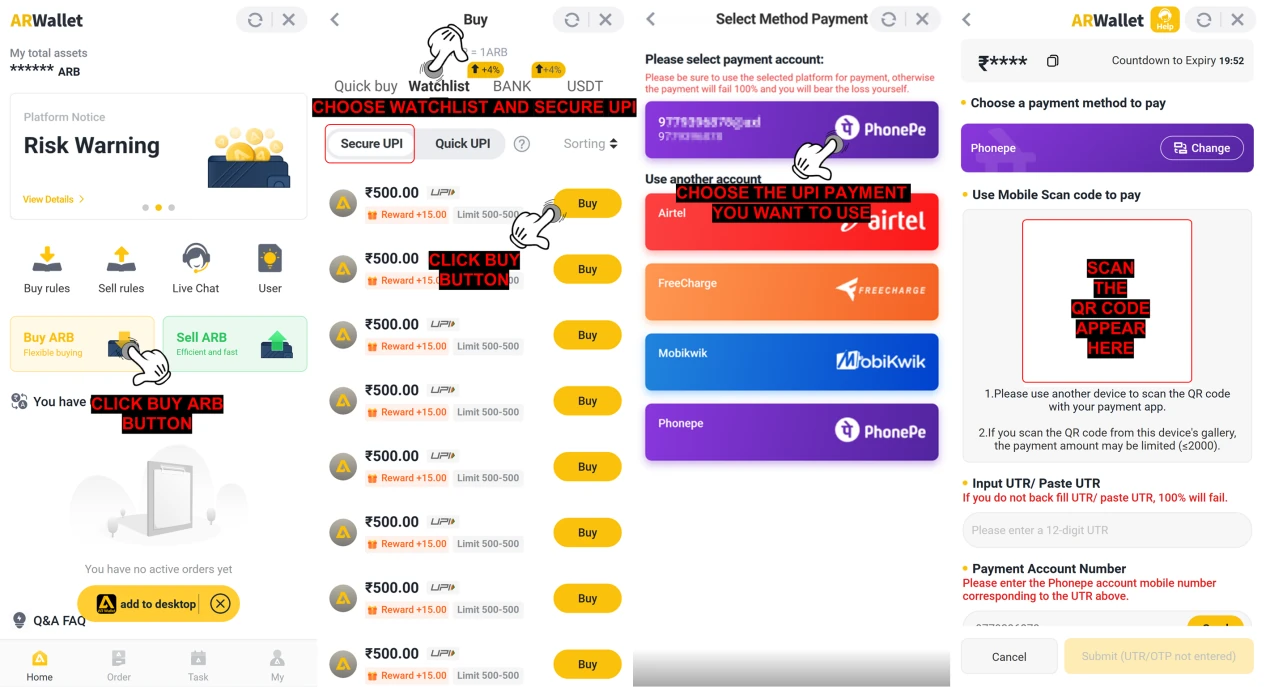
 After confirming the purchase, continue with the payment using the steps below :
- Open the ARWallet app
- Go to your homepage
- Click the "Buy ARB" button
- Choose "Watchlist" and click the "Secure UPI" button
- Choose the amount of ARB you want to buy
- Click the "Buy" button to proceed
- Choose the UPI Payment that you want to use as a payment method
- After selecting a payment method, Screenshot or scan the QR code and pay with your preferred app
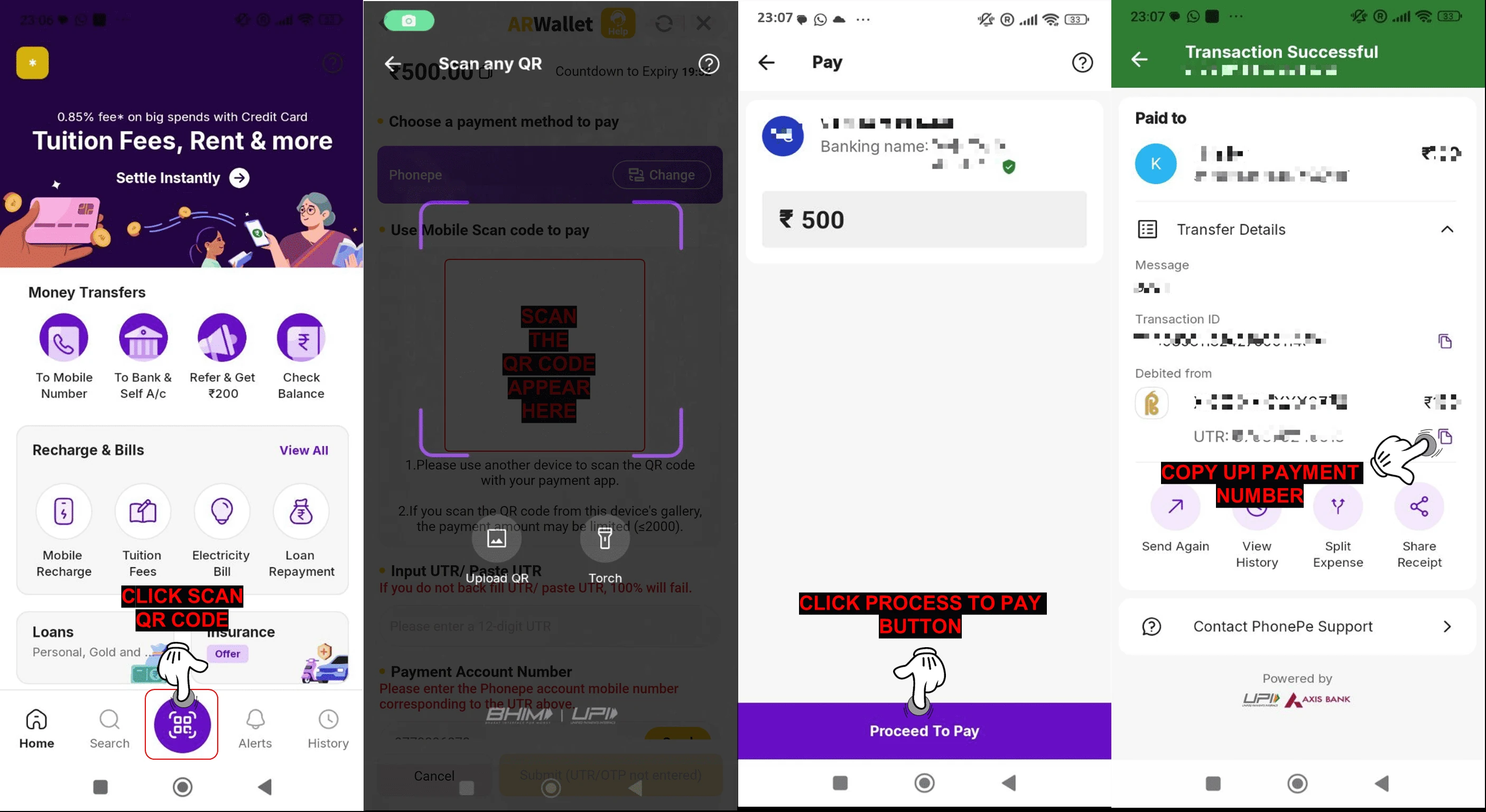
💳 Payment Process
- Open your banking application
- Click "Scan QR"
- Click the "Process to Pay" button
- After payment, copy the UTR number and return to AR Wallet
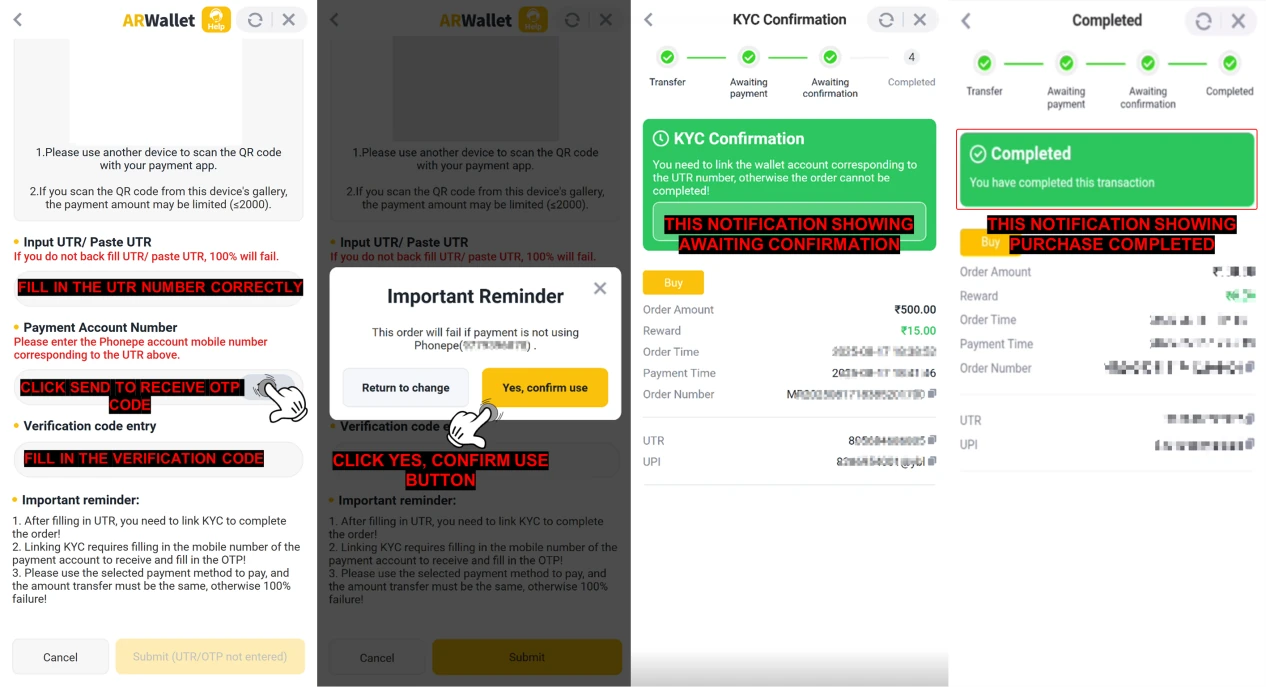
- Paste the UTR number (Unique Transaction Reference) after completing the transfer
- Click the "Send" button to receive the OTP verification code
- Fill in the verification code correctly and click "Submit" button
- Read "Important Reminder". Click "Yes, confirm use" if you paid using the selected payment method. If not, click "Return to change" to change another payment method
- After submitting the UTR number and confirming your payment method, please wait for confirmation
- Once you've paid using your selected payment method, your buy order will be completed automatically
📝Note :
- Ensure all payments are genuine and do not upload false or misleading information.
- Submitting fake details or placing malicious orders may result in permanent suspension of your ARWallet account.
- Always pay the exact order amount. ARWallet will not be responsible for any loss if you overpay or underpay, as this will be treated as your own mistake.
- Failure to follow the payment instructions may cause your order to fail.
🛒How To Buy ARB Coins Via Bank Method
Q : How can I purchase ARB on ARWallet using BANK Method?
A : Follow the steps below to purchase ARB through the ARWallet mobile app :
![How To Buy ARB Coins Via Bank Method — step screenshot]()
![How To Buy ARB Coins Via Bank Method — step screenshot]() After confirming the purchase, continue with the payment using the steps below :
After confirming the purchase, continue with the payment using the steps below :
![How To Buy ARB Coins Via Bank Method — step screenshot]()
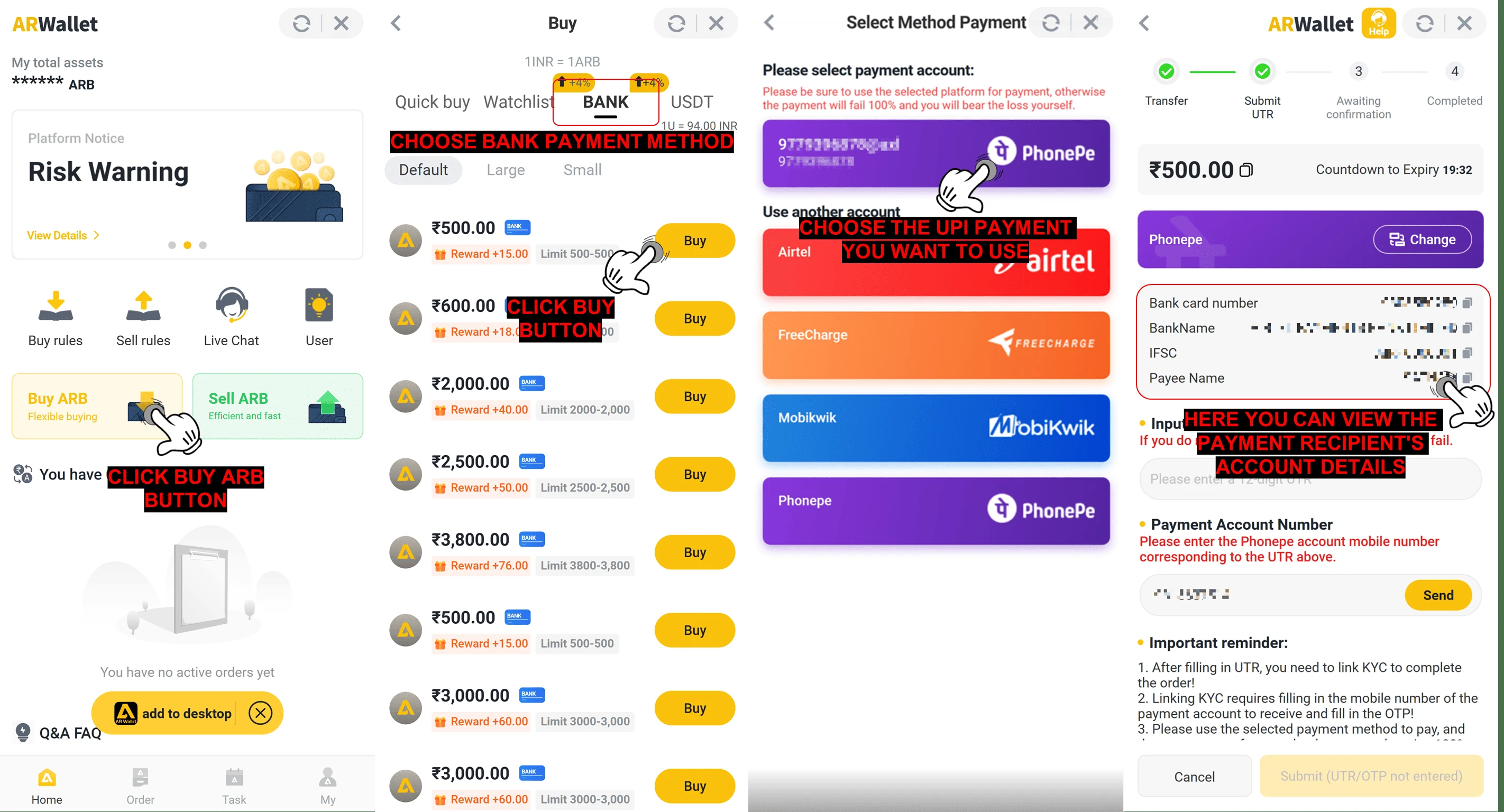
- Open the ARWallet app
- Go to your homepage
- Click the "Buy ARB" button
- Choose "BANK" for purchase
- Choose "Default", "Large", or "Small" options to view the amount
- Choose the amount of ARB you want to buy
- Click "Buy" button to proceed
- Choose your preferred UPI payment method, copy the seller's bank account information, and complete the transaction using your chosen UPI payment app
💳 Payment Process
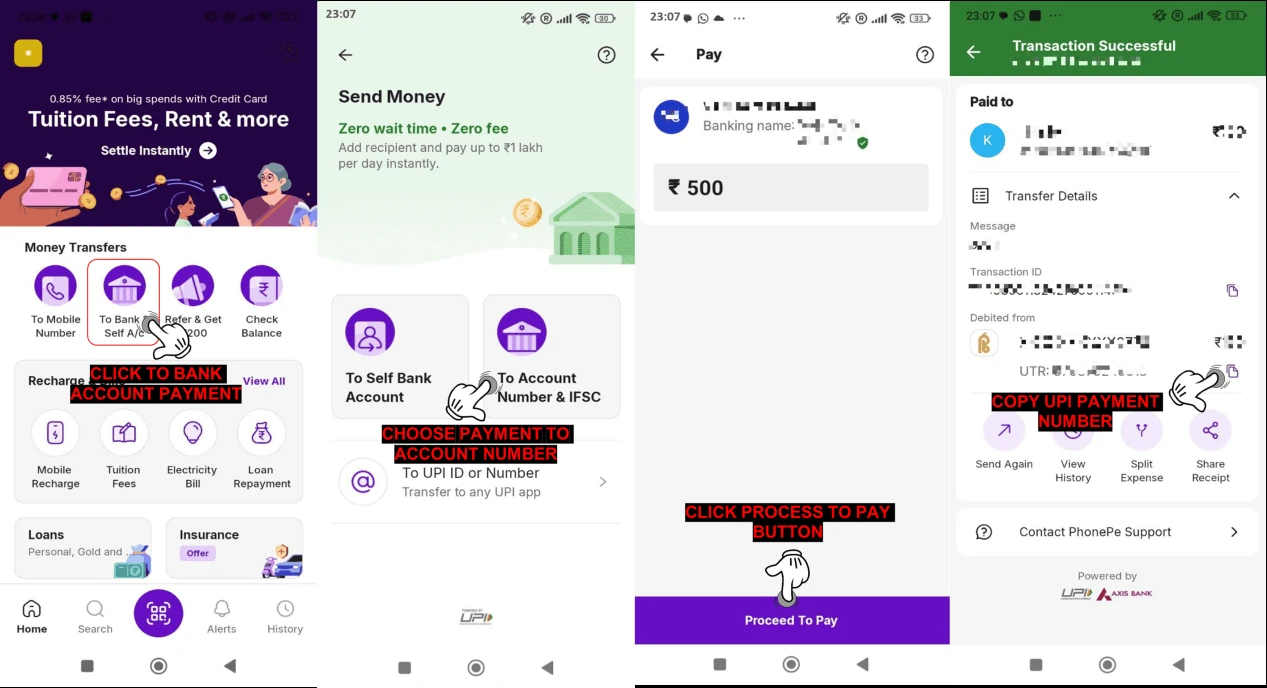
- Open your chosen UPl payment app
- Click "To Bank Account" button
- Choose "To Account Number & IFSC" button
- Paste the copied bank account details
- Double-check that they match the seller's information, and enter the order amount accurately.
- Click the "Process to Pay" button
- After payment, copy the UTR number and return to AR Wallet
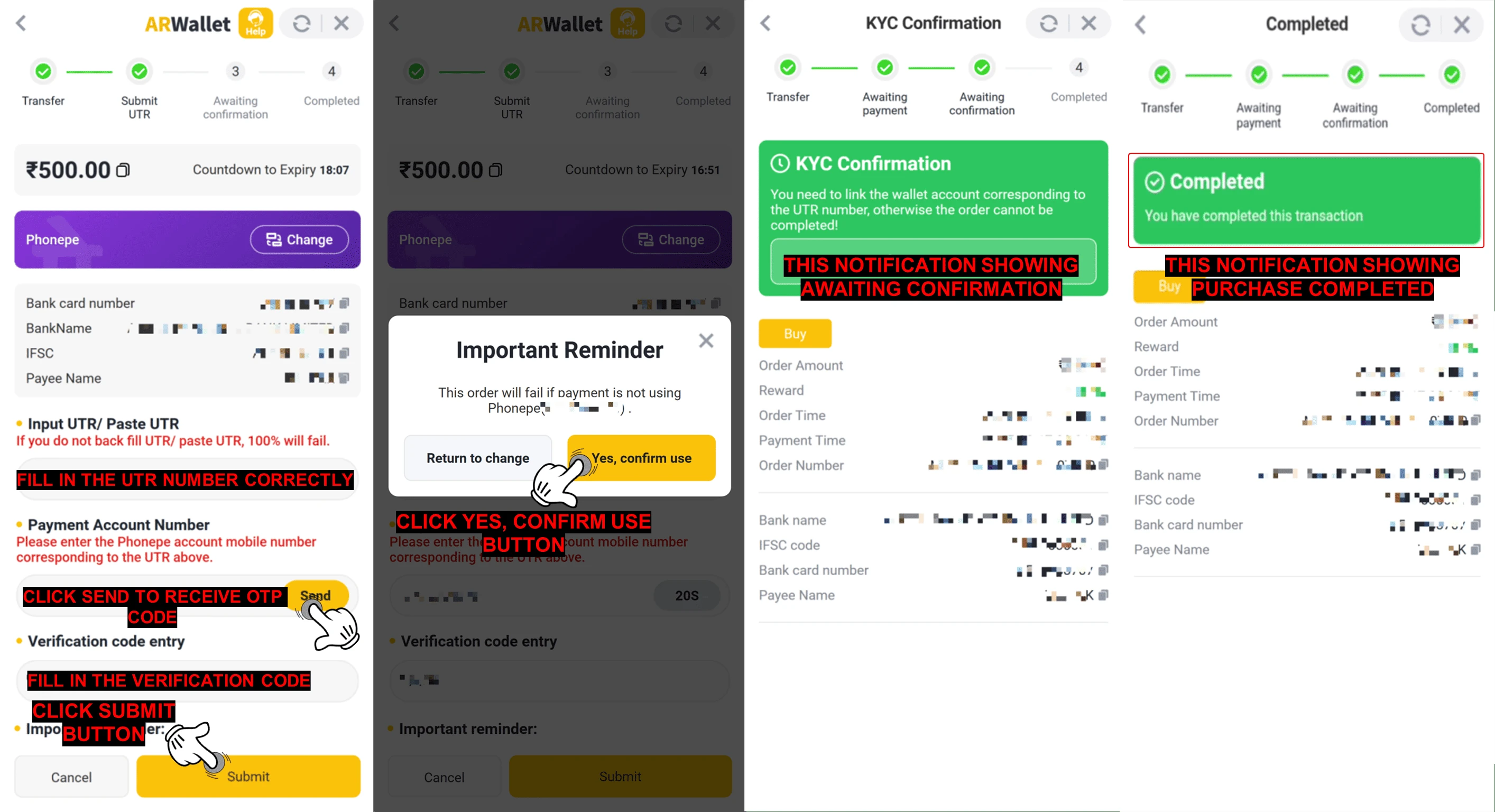
- Paste the UTR number (Unique Transaction Reference) after completing the transfer
- Click the "Send" button to receive the OTP verification code
- Fill in the verification code correctly and click "Submit" button
- Read "Important Reminder". Click "Yes, confirm use" if you paid using the selected payment method. If not, click "Return to change" to change another payment method
- After submitting the UTR number and confirming your payment method, please wait for confirmation
- Once you've paid using your selected payment method, your buy order will be completed Automatically
📝Note :
- Ensure all payments are genuine and do not upload false or misleading information.
- Submitting fake details or placing malicious orders may result in permanent suspension of your ARWallet account.
- Always pay the exact order amount. ARWallet will not be responsible for any loss if you overpay or underpay, as this will be treated as your own mistake.
- Failure to follow the payment instructions may cause your order to fail.
🛒How To Buy ARB Coins Using Quick UPI
Q : How do I purchase ARB using ARWallet using Watchlist Method "Quick UPI" ?
A : Follow the steps below to purchase ARB through the ARWallet mobile app :
![How To Buy ARB Coins Using Quick UPI — step screenshot]()
![How To Buy ARB Coins Using Quick UPI — step screenshot]()
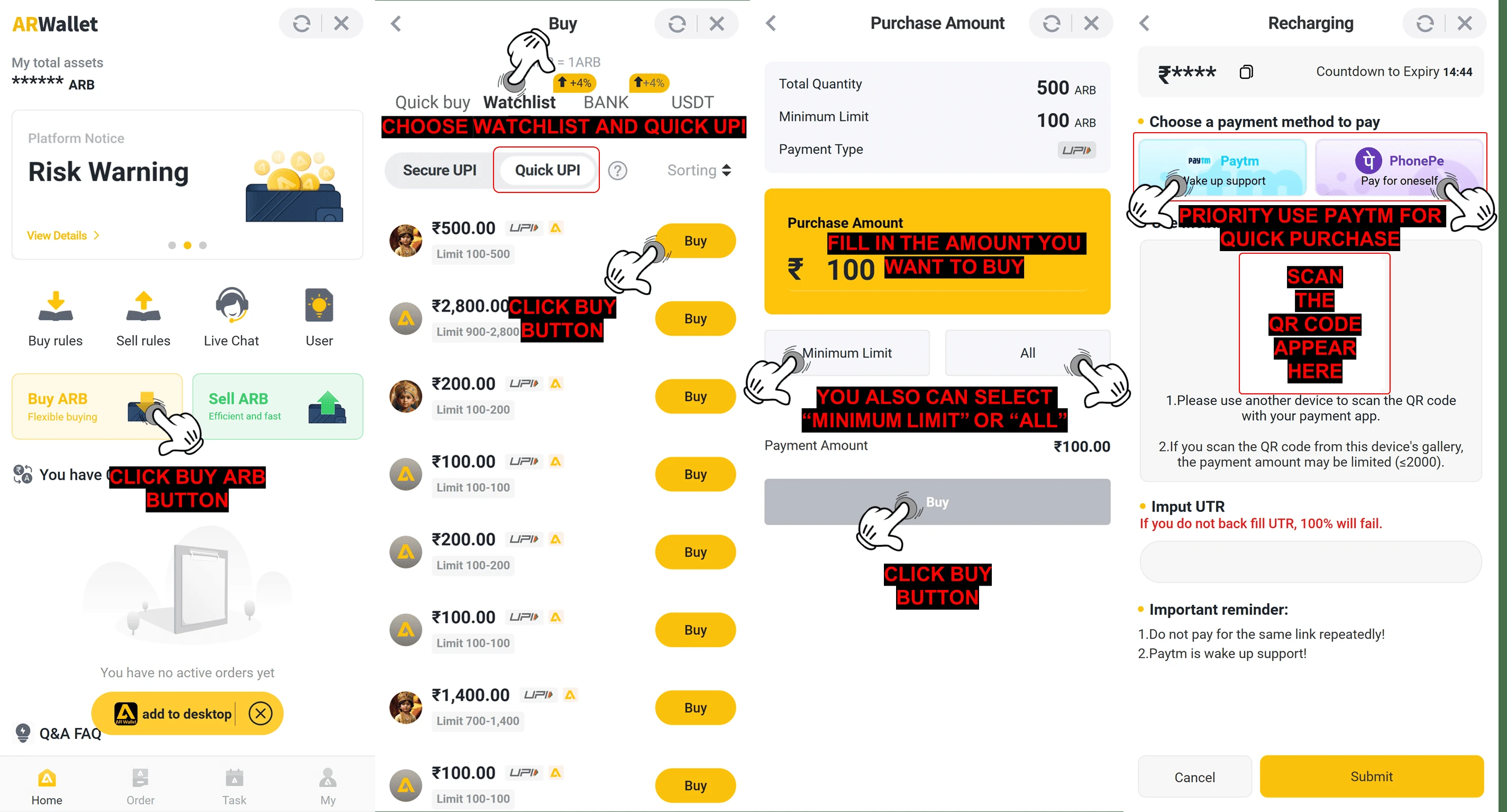
- Open the ARWallet app
- Go to your homepage
- Click the "Buy ARB" button
- Choose "Watchlist" and "Quick UPI" to buy from market list
- Choose the amount of ARB you want to buy
- Click "Buy" again to proceed to payment
- You can enter an ARB amount within the minimum limit and total quantity, or click "Minimum Limit" or "All."
- Click "Buy" again to proceed to payment
- Choose the priority payment method, or take a screenshot/scan the QR code in your UPI app
💳 Payment Process
After click buy button, continue with the payment using the steps below :
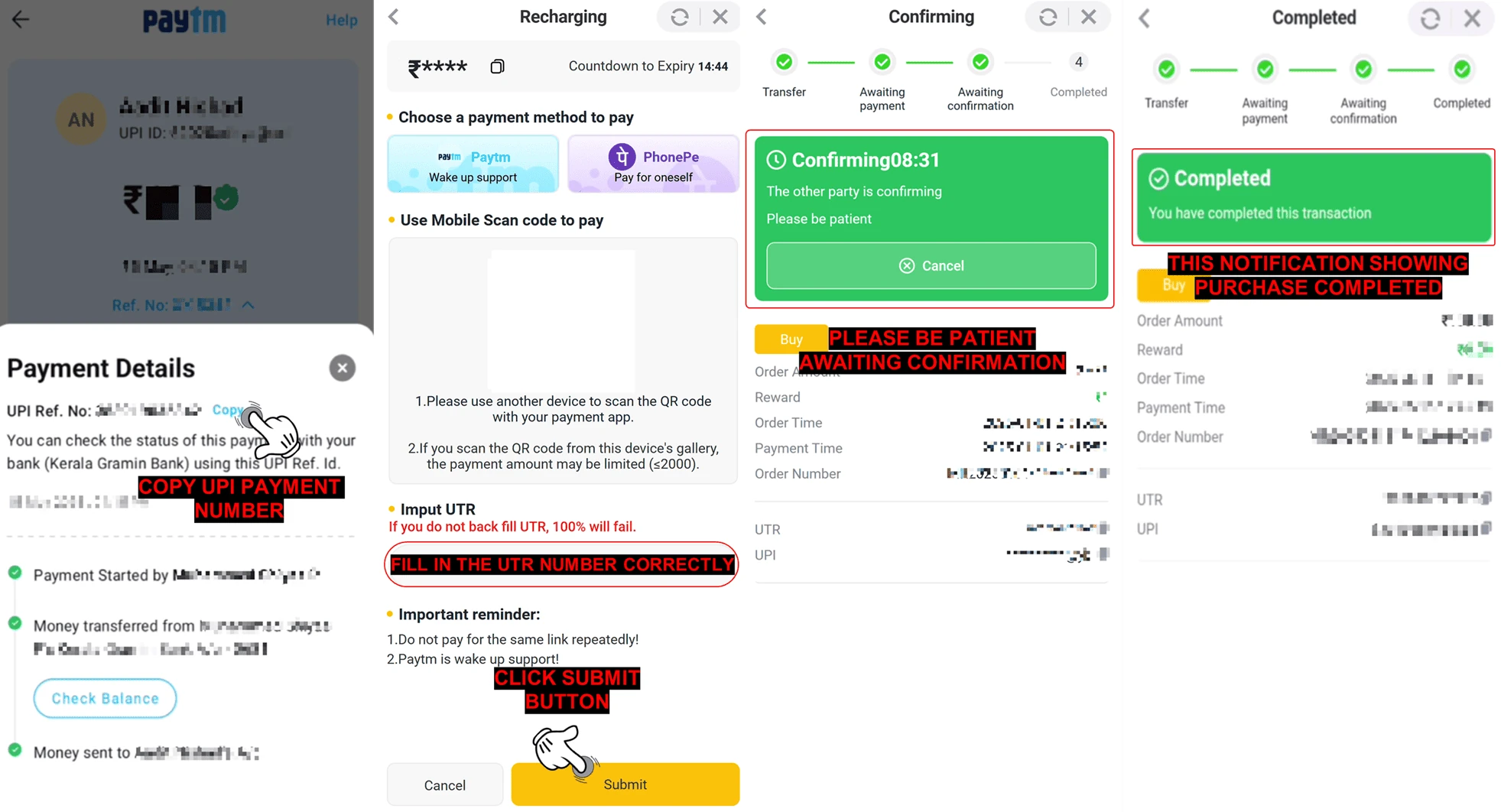
- Copy the UTR number (Unique Transaction Reference) from your payment app after completing the payment
- Paste the UTR number in AR Wallet
- Click the "Submit" button to confirm your payment
- Wait for the confirmation after submitting the UTR number
- If you have paid and submitted the correct UTR number, your buy order will be completed automatically.
📝Note :
- Ensure all payments are genuine and do not upload false or misleading information.
- Submitting fake details or placing malicious orders may result in permanent suspension of your ARWallet account.
- Always pay the exact order amount. ARWallet will not be responsible for any loss if you overpay or underpay, as this will be treated as your own mistake.
- Failure to follow the payment instructions may cause your order to fail.
🛒How To Buy ARB Coins Via Quick Buy Method
Q : How do I purchase ARB using ARWallet?
A : Follow the steps below to purchase ARB through the ARWallet mobile app :
![How To Buy ARB Coins Via Quick Buy Method — step screenshot]()
![How To Buy ARB Coins Via Quick Buy Method — step screenshot]()
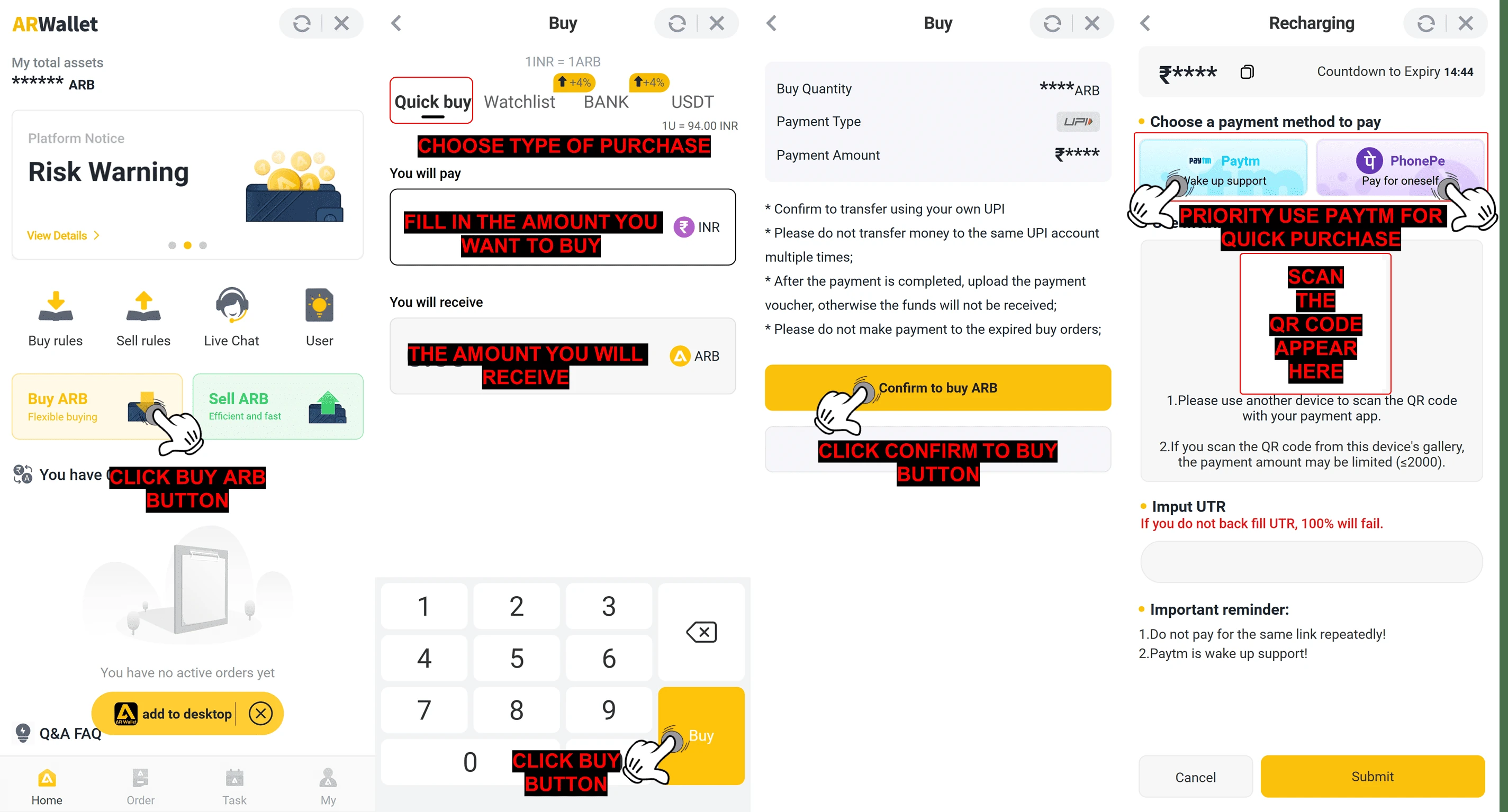
- Open the ARWallet app
- Go to your homepage
- Click the "Buy ARB" button
- Choose "Quick Buy" for a fast purchase
- Enter the amount of ARB you want to buy
- Click the "Buy" button to proceed
- Review the transaction details and click "Confirm to buy ARB" button
- Select a payment method to complete the purchase
- Choose the priority payment method, or take a screenshot/scan the QR code in your UPI app
💳 Payment Process
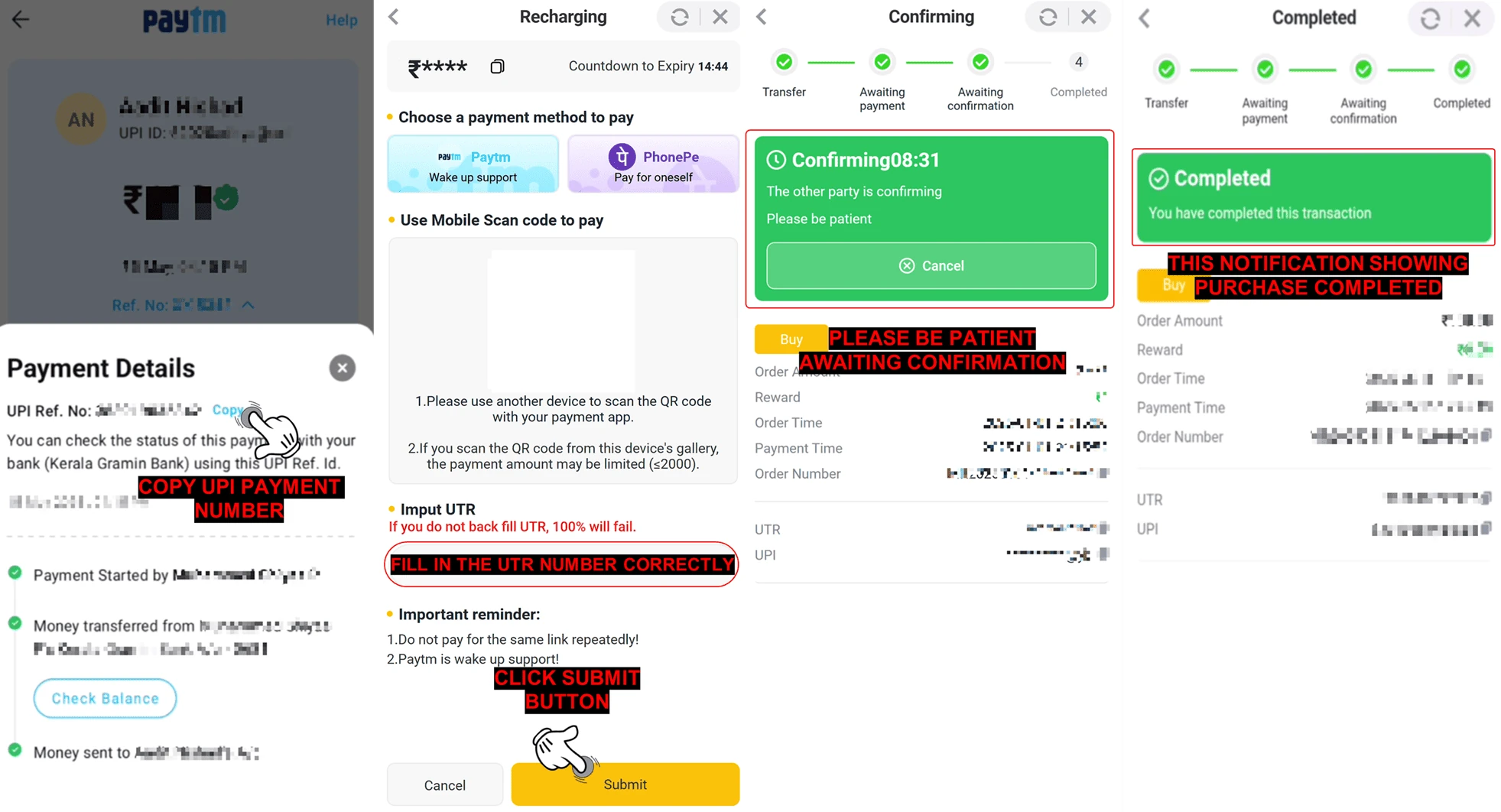
After click buy button, continue with the payment using the steps below :
- Copy the UTR number (Unique Transaction Reference) from your payment app after completing the payment
- Paste the UTR number in AR Wallet
- Click the "Submit" button to confirm your payment
- Wait for the confirmation after submitting the UTR number
- If you have paid and submitted the correct UTR number, your buy order will be completed automatically.
📝Note :
- Ensure all payments are genuine and do not upload false or misleading information.
- Submitting fake details or placing malicious orders may result in permanent suspension of your ARWallet account.
- Always pay the exact order amount. ARWallet will not be responsible for any loss if you overpay or underpay, as this will be treated as your own mistake.
- Failure to follow the payment instructions may cause your order to fail.
🛒सुरक्षित यूपीआई का उपयोग करके ARB सिक्के कैसे खरीदें
प्रश्न : मैं सुरक्षित UPI का उपयोग करके ARWallet पर ARB कैसे खरीद सकता हूं?
उत्तर : ARWALLET मोबाइल ऐप के माध्यम से ARB खरीदने के लिए नीचे दिए गए चरणों का पालन करें :
![How To Buy ARB Coins Using Secure UPI — step screenshot]()
![How To Buy ARB Coins Using Secure UPI — step screenshot]() खरीदारी की पुष्टि करने के बाद, नीचे दिए गए चरणों का पालन करके भुगतान जारी रखें :
खरीदारी की पुष्टि करने के बाद, नीचे दिए गए चरणों का पालन करके भुगतान जारी रखें :
![How To Buy ARB Coins Using Secure UPI — step screenshot]()
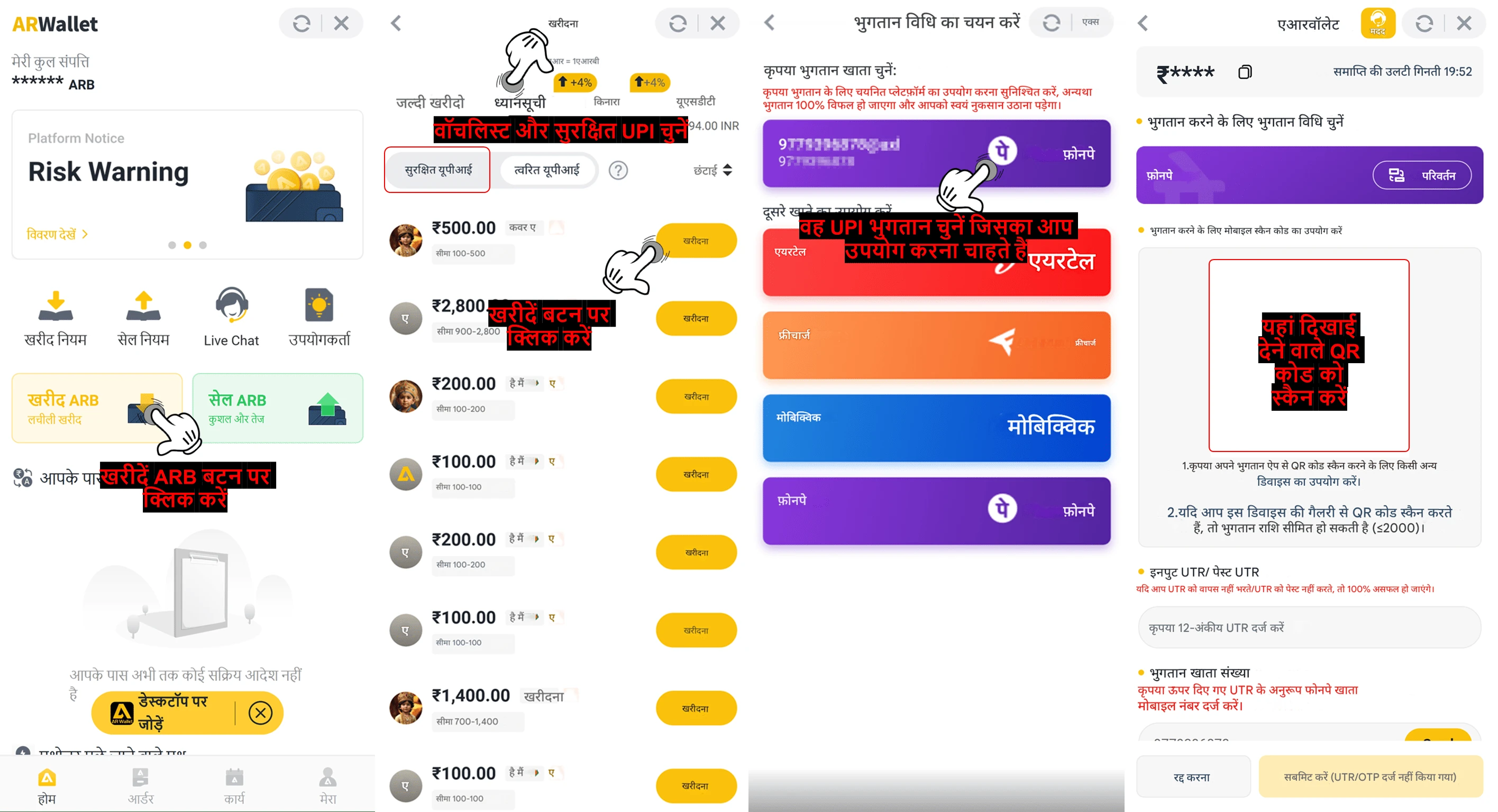
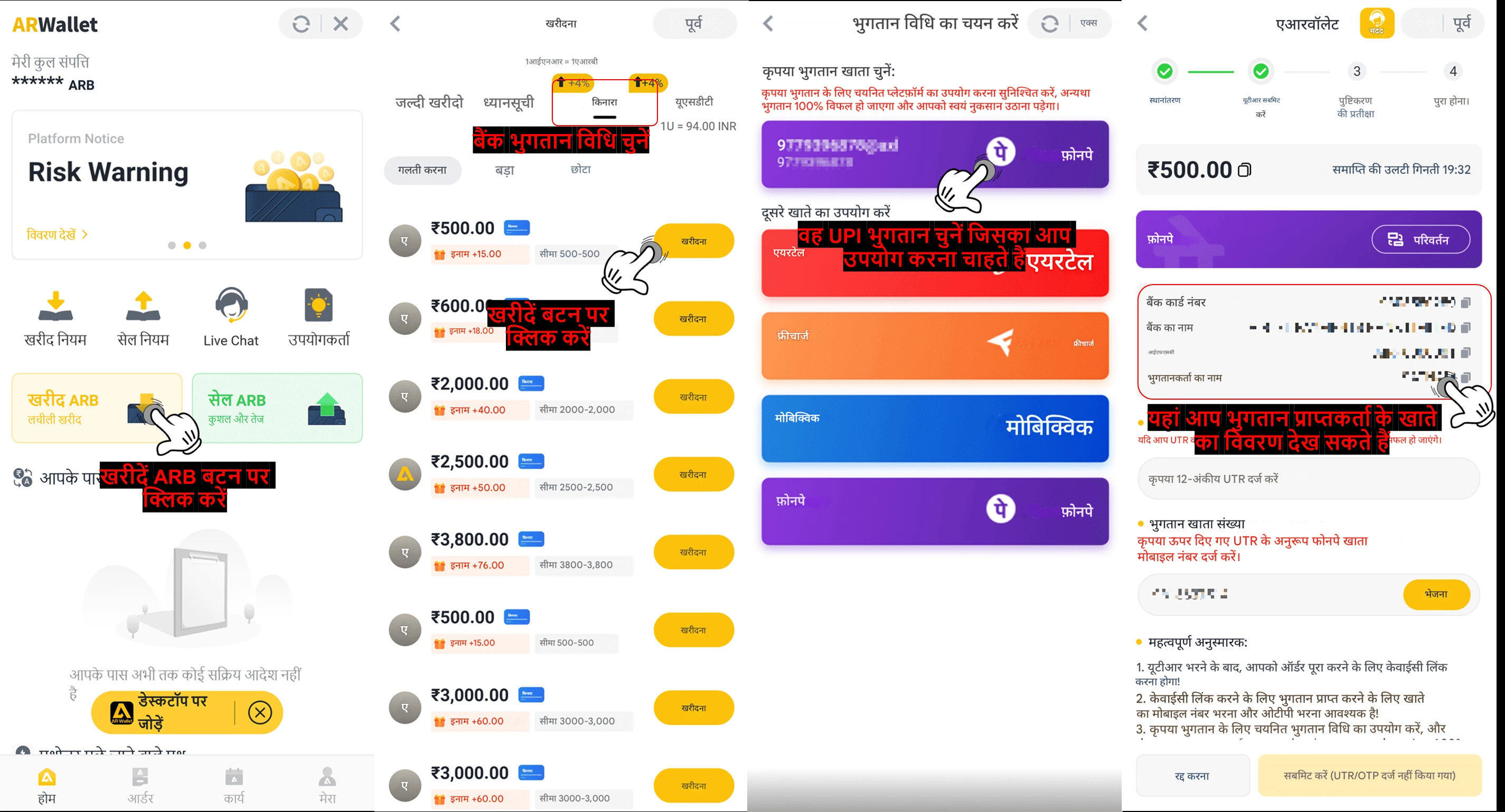
- ARWALLET ऐप खोलें
- अपने होमपेज पर जाएँ
- "ARB खरीदें" बटन पर क्लिक करें
- "वॉचलिस्ट" चुनें और "सुरक्षित UPI" बटन पर क्लिक करें
- वह ARB राशि चुनें जिसे आप खरीदना चाहते हैं
- आगे बढ़ने के लिए "खरीदें" बटन पर क्लिक करें
- वह UPI भुगतान चुनें जिसे आप भुगतान विधि के रूप में उपयोग करना चाहते हैं
- भुगतान विधि चुनने के बाद, स्क्रीनशॉट लें या QR कोड स्कैन करें और अपने पसंदीदा ऐप से भुगतान करें
💳 भुगतान प्रक्रिया
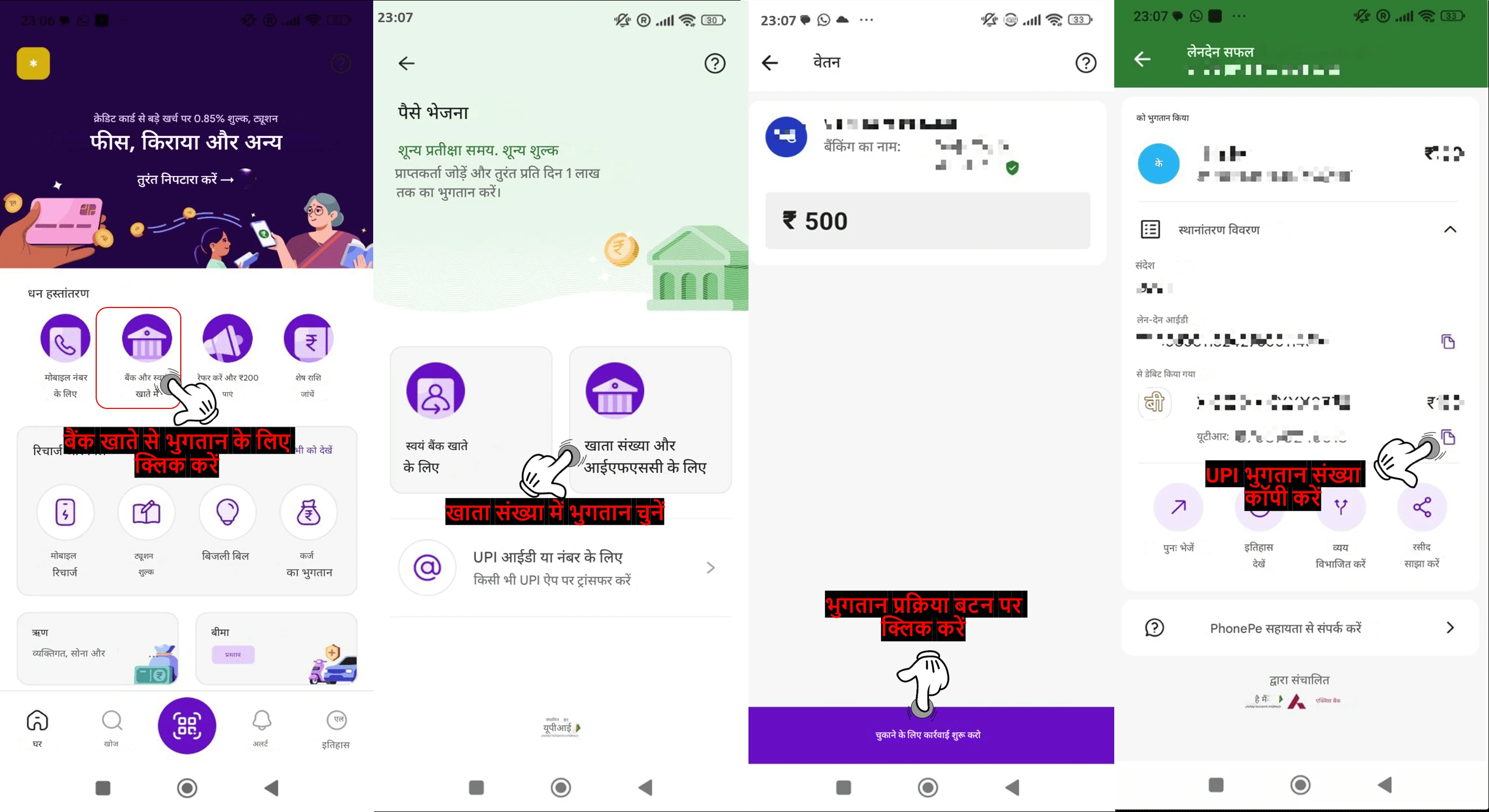
- अपना बैंकिंग एप्लिकेशन खोलें
- "स्कैन क्यूआर" पर क्लिक करें
- "भुगतान प्रक्रिया" बटन पर क्लिक करें
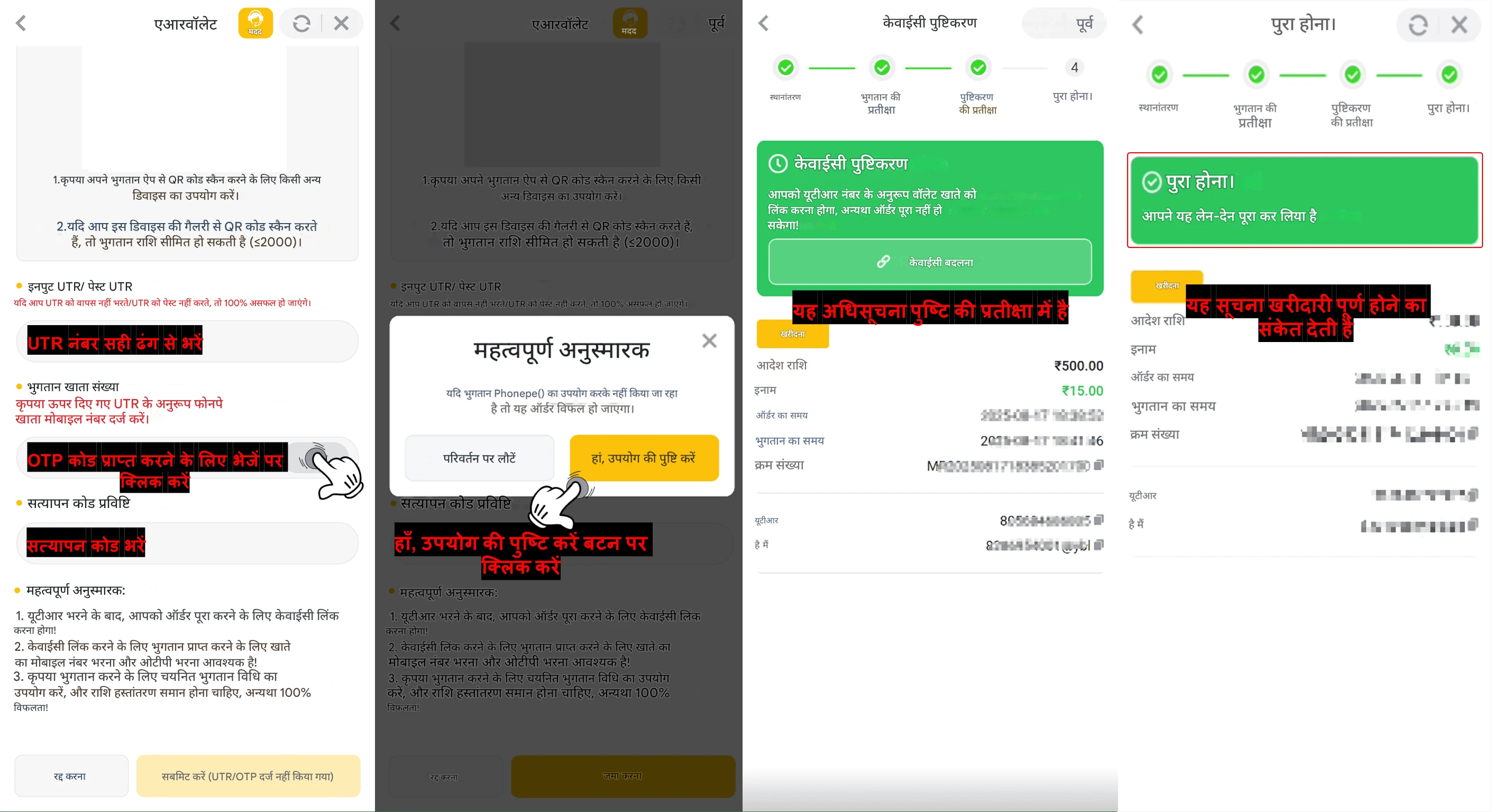
- भुगतान के बाद, UTR नंबर की प्रतिलिपि बनाएँ और AR वॉलेट में वापस भेजें
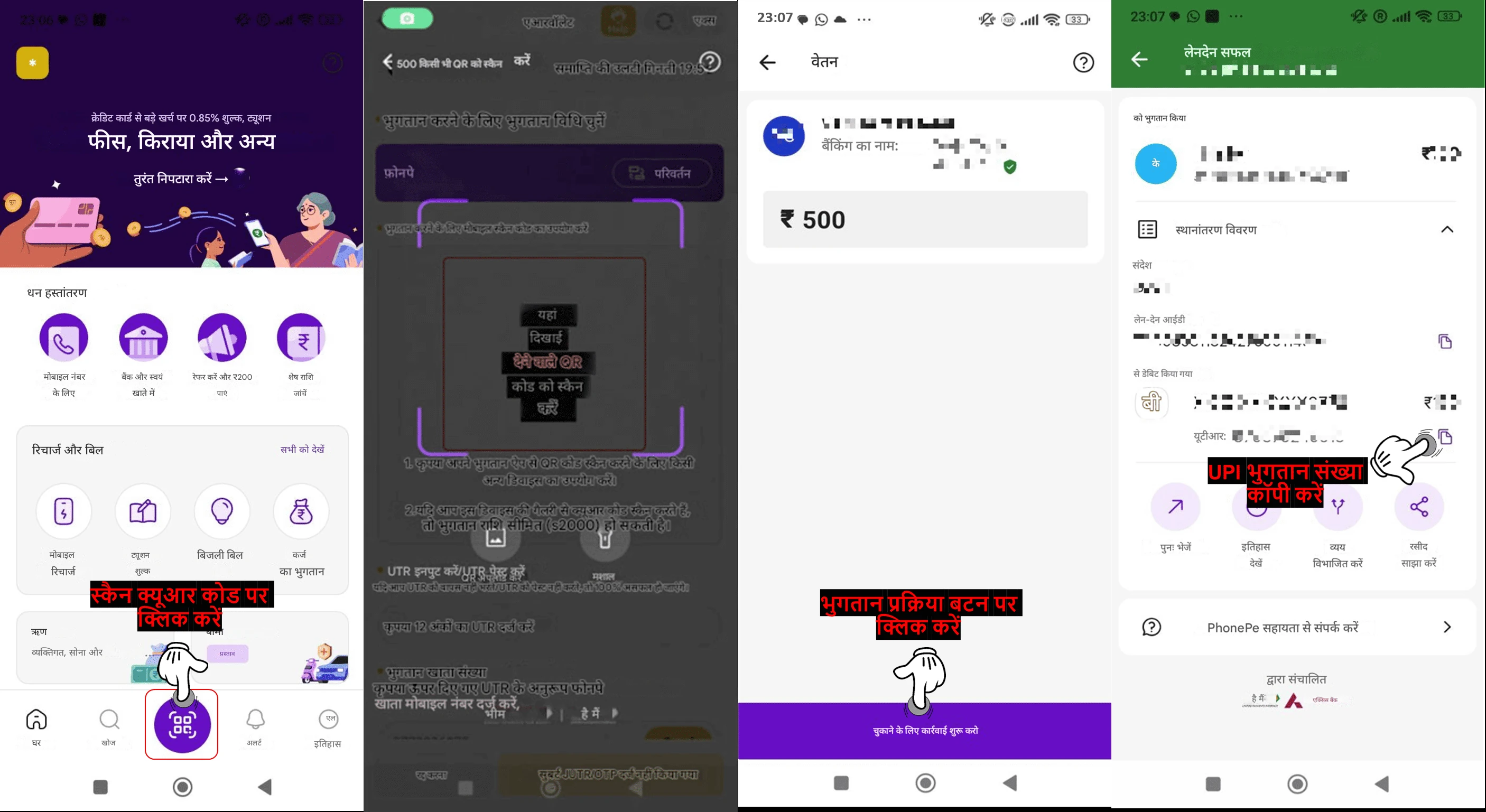
- ट्रांसफ़र पूरा करने के बाद UTR नंबर (यूनिक ट्रांज़ैक्शन रेफ़रेंस) पेस्ट करें
- OTP सत्यापन कोड प्राप्त करने के लिए "भेजें" बटन पर क्लिक करें
- सत्यापन कोड सही ढंग से भरें और "सबमिट करें" बटन पर क्लिक करें
- "महत्वपूर्ण अनुस्मारक" पढ़ें। यदि आपने चुनी गई भुगतान विधि से भुगतान किया है, तो "हाँ, उपयोग की पुष्टि करें" पर क्लिक करें। यदि नहीं, तो दूसरी भुगतान विधि बदलने के लिए "बदलाव पर वापस जाएँ" पर क्लिक करें।
- UTR नंबर सबमिट करने और अपनी भुगतान विधि की पुष्टि करने के बाद, कृपया पुष्टिकरण की प्रतीक्षा करें
- अपनी चुनी हुई भुगतान विधि से भुगतान करने के बाद, आपका खरीद ऑर्डरस्वचालित रूप से पूरा हो जाएगा
📝टिप्पणी :
- सुनिश्चित करें कि सभी भुगतान वास्तविक हों और गलत या भ्रामक जानकारी अपलोड न करें।
- फर्जी विवरण सबमिट करने या दुर्भावनापूर्ण ऑर्डर देने से आपका ARWallet खाता स्थायी रूप से निलंबित हो सकता है।
- हमेशा ऑर्डर की सही राशि का भुगतान करें। यदि आप अधिक या कम भुगतान करते हैं, तो ARWallet किसी भी नुकसान के लिए ज़िम्मेदार नहीं होगा, क्योंकि इसे आपकी अपनी गलती माना जाएगा।
- भुगतान निर्देशों का पालन न करने पर आपका ऑर्डर विफल हो सकता है।
🛒बैंक विधि से ARB सिक्के कैसे खरीदें
प्रश्न : मैं बैंक विधि का उपयोग करके ARWallet पर ARB कैसे खरीद सकता हूं?
उत्तर : ARWALLET मोबाइल ऐप के माध्यम से ARB खरीदने के लिए नीचे दिए गए चरणों का पालन करें :
![How To Buy ARB Coins Via Bank Method — step screenshot]()
![How To Buy ARB Coins Via Bank Method — step screenshot]() खरीदारी की पुष्टि करने के बाद, नीचे दिए गए चरणों का पालन करके भुगतान जारी रखें :
खरीदारी की पुष्टि करने के बाद, नीचे दिए गए चरणों का पालन करके भुगतान जारी रखें :
![How To Buy ARB Coins Via Bank Method — step screenshot]()
- ARWallet ऐप खोलें
- अपने होमपेज पर जाएँ
- "ARB खरीदें" बटन पर क्लिक करें
- खरीदारी के लिए "बैंक" चुनें
- राशि देखने के लिए "डिफ़ॉल्ट", "बड़ा" या "छोटा" विकल्प चुनें
- आप जितनी ARB खरीदना चाहते हैं, उतनी राशि चुनें
- आगे बढ़ने के लिए "खरीदें" बटन पर क्लिक करें
- अपनी पसंदीदा UPI भुगतान विधि चुनें, विक्रेता के बैंक खाते की जानकारी कॉपी करें, और अपने चुने हुए UPI भुगतान ऐप का उपयोग करके लेनदेन पूरा करें
💳 भुगतान प्रक्रिया
- अपना चुना हुआ UPI भुगतान ऐप खोलें
- "बैंक खाते में" बटन पर क्लिक करें
- "खाता संख्या और IFSC में" बटन चुनें
- कॉपी किए गए बैंक खाते का विवरण पेस्ट करें
- दोबारा जांच लें कि वे विक्रेता की जानकारी से मेल खाते हैं, और ऑर्डर राशि सही दर्ज करें।
- "भुगतान प्रक्रिया" बटन पर क्लिक करें
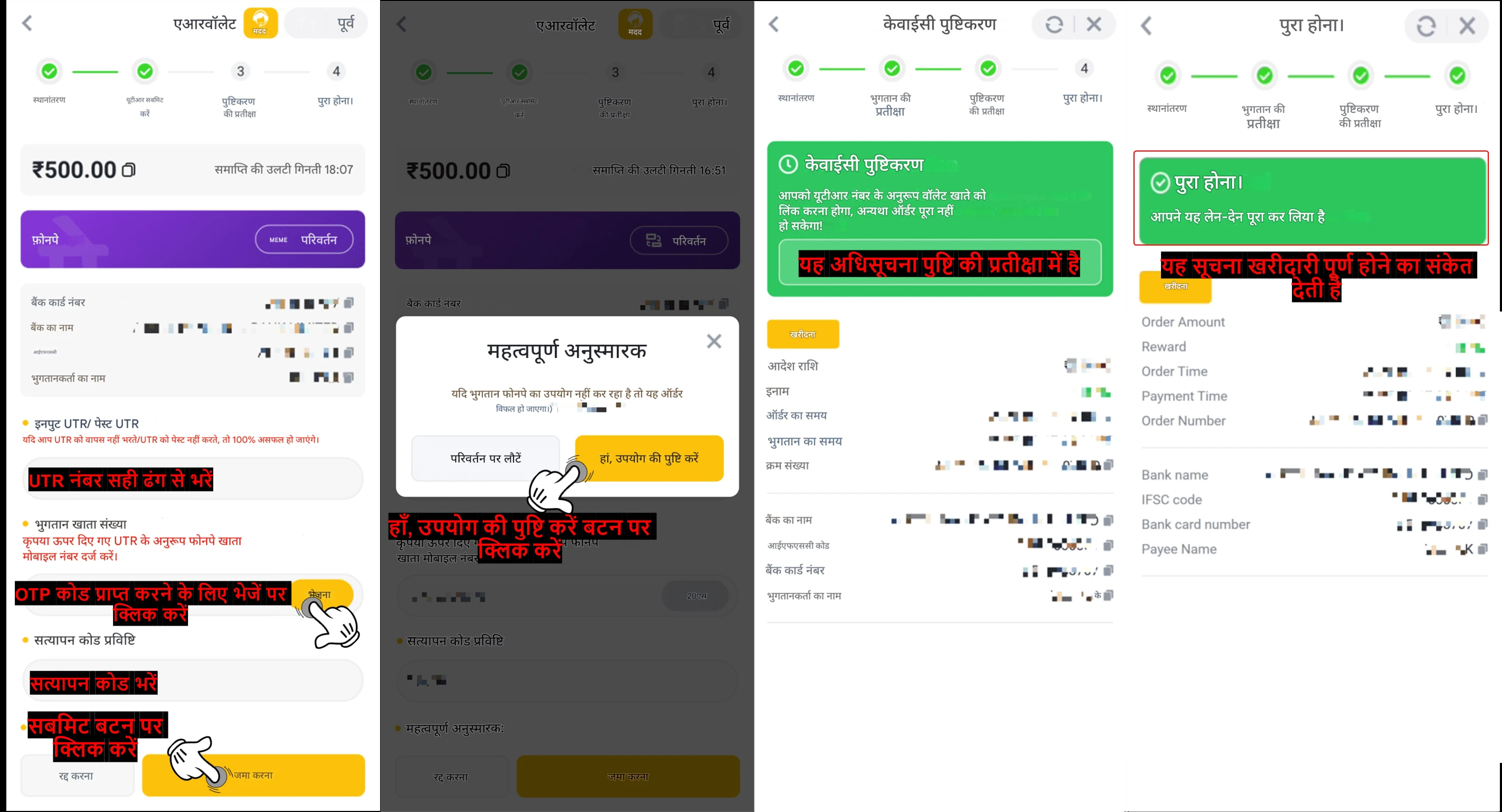
- भुगतान के बाद, UTR नंबर कॉपी करें और AR वॉलेट में वापस डालें
- ट्रांसफ़र पूरा करने के बाद UTR नंबर (यूनिक ट्रांज़ैक्शन रेफ़रेंस) पेस्ट करें
- OTP सत्यापन कोड प्राप्त करने के लिए "भेजें" बटन पर क्लिक करें
- सत्यापन कोड सही ढंग से भरें और "सबमिट करें" बटन पर क्लिक करें
- "महत्वपूर्ण अनुस्मारक" पढ़ें। यदि आपने चुनी गई भुगतान विधि से भुगतान किया है, तो "हाँ, उपयोग की पुष्टि करें" पर क्लिक करें। यदि नहीं, तो दूसरी भुगतान विधि बदलने के लिए "बदलाव पर वापस जाएँ" पर क्लिक करें।
- UTR नंबर सबमिट करने और अपनी भुगतान विधि की पुष्टि करने के बाद, कृपया पुष्टिकरण की प्रतीक्षा करें
- अपनी चुनी हुई भुगतान विधि से भुगतान करने के बाद, आपका खरीद ऑर्डर
📝टिप्पणी :
- सुनिश्चित करें कि सभी भुगतान वास्तविक हों और गलत या भ्रामक जानकारी अपलोड न करें।
- फर्जी विवरण सबमिट करने या दुर्भावनापूर्ण ऑर्डर देने से आपका ARWallet खाता स्थायी रूप से निलंबित हो सकता है।
- हमेशा ऑर्डर की सही राशि का भुगतान करें। यदि आप अधिक या कम भुगतान करते हैं, तो ARWallet किसी भी नुकसान के लिए ज़िम्मेदार नहीं होगा, क्योंकि इसे आपकी अपनी गलती माना जाएगा।
- भुगतान निर्देशों का पालन न करने पर आपका ऑर्डर विफल हो सकता है।
🛒कैसे त्वरित UPI का उपयोग करके ARB सिक्के खरीदने के लिए
प्रश्न : मैं वॉचलिस्ट विधि "क्विक यूपीआई" का उपयोग करके ARWallet पर ARB कैसे खरीद सकता हूं?
उत्तर : ARWALLET मोबाइल ऐप के माध्यम से ARB खरीदने के लिए नीचे दिए गए चरणों का पालन करें :
![How To Buy ARB Coins Using Quick UPI — step screenshot]()
![How To Buy ARB Coins Using Quick UPI — step screenshot]()
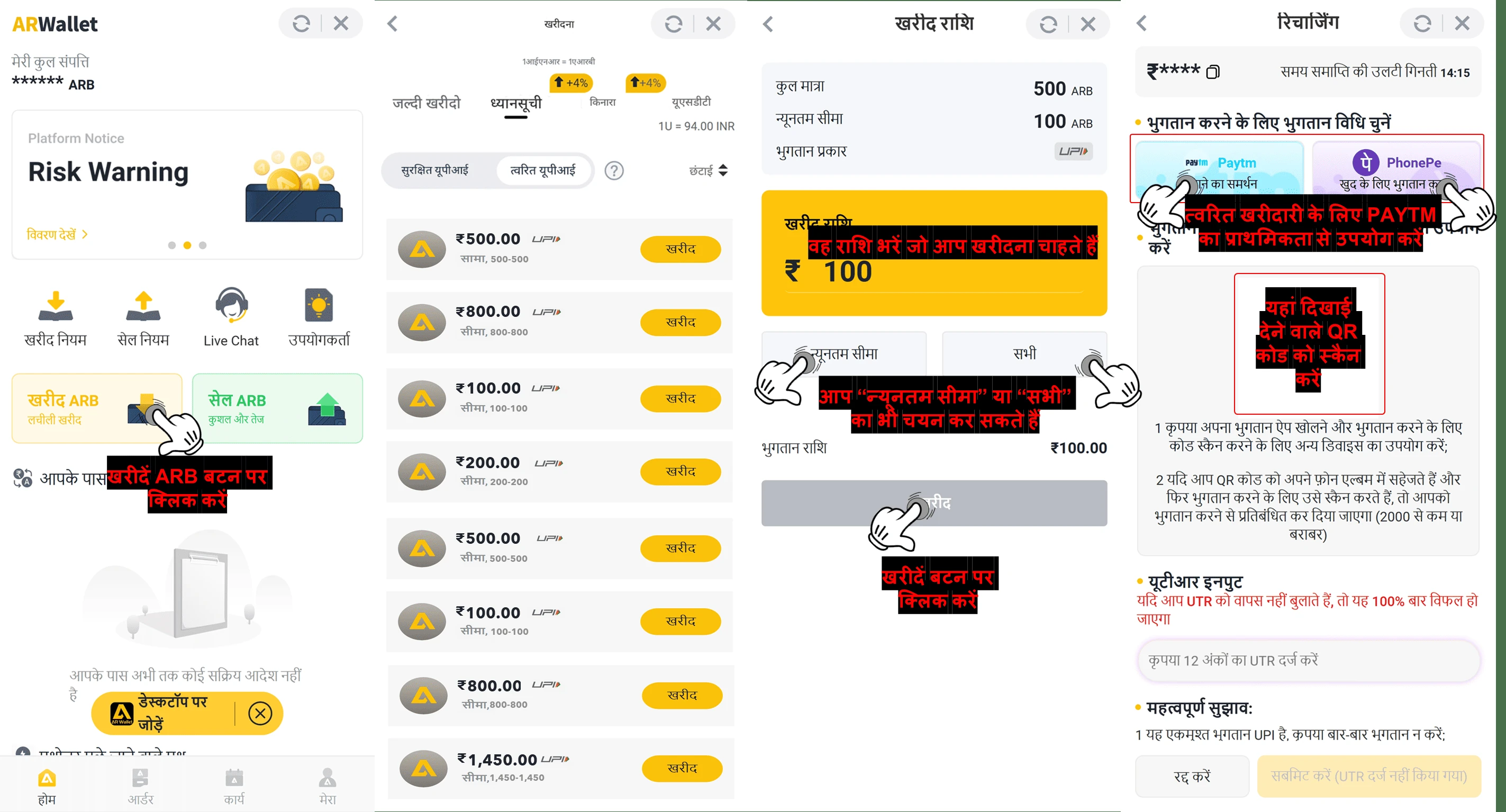
- ARWALLET ऐप खोलें
- अपने होमपेज पर जाएँ
- "ARB खरीदें" बटन पर क्लिक करें
- बाज़ार सूची से खरीदारी करने के लिए "वॉचलिस्ट" और फिर "क्विक UPI" चुनें
- आप जितनी ARB खरीदना चाहते हैं, उसकी मात्रा चुनें
- आगे बढ़ने के लिए "खरीदें" बटन पर क्लिक करें
- आप न्यूनतम सीमा और कुल मात्रा के भीतर ARB राशि दर्ज कर सकते हैं, या "न्यूनतम सीमा" या "सभी" पर क्लिक करें।
- भुगतान के लिए फिर से "खरीदें" पर क्लिक करें
- प्राथमिकता भुगतान विधि चुनें, या अपने UPI ऐप में स्क्रीनशॉट लें/QR कोड स्कैन करें
💳 भुगतान प्रक्रिया
खरीद की पुष्टि करने के बाद, नीचे दिए गए चरणों का उपयोग करके भुगतान जारी रखें :
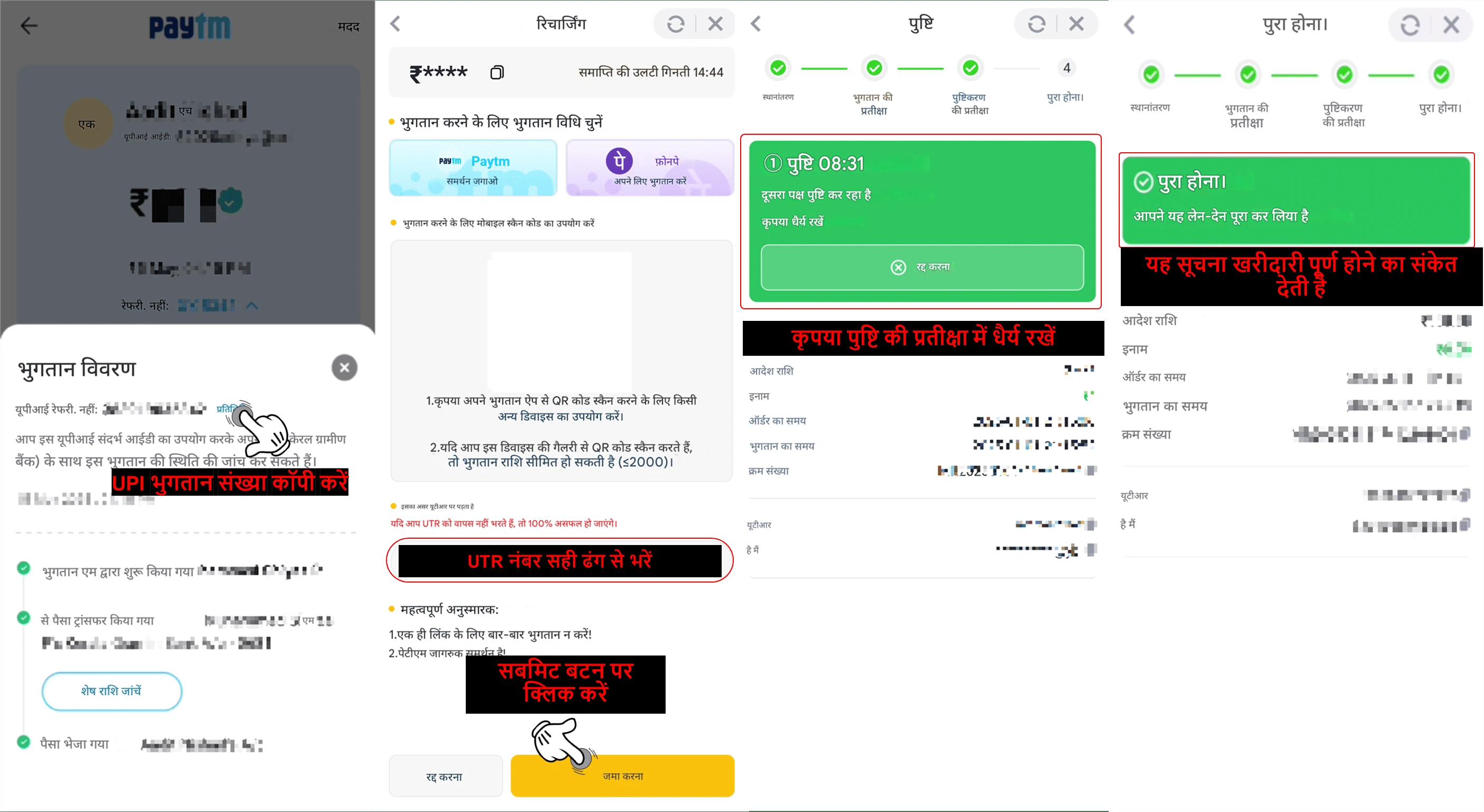
- भुगतान पूरा करने के बाद अपने भुगतान ऐप से UTR नंबर (यूनिक ट्रांजेक्शन रेफरेंस) कॉपी करें
- कृपया UTR नंबर को AR Wallet में पेस्ट करें।
- अपने भुगतान की पुष्टि के लिए "सबमिट" बटन पर क्लिक करें
- UTR नंबर सबमिट करने के बाद पुष्टि की प्रतीक्षा करें
- यदि आपने भुगतान कर दिया है और सही UTR नंबर सबमिट कर दिया है, तो आपका खरीद ऑर्डर अपने आप पूरा हो जाएगा।
📝टिप्पणी :
- सुनिश्चित करें कि सभी भुगतान वास्तविक हों और गलत या भ्रामक जानकारी अपलोड न करें।
- फर्जी विवरण सबमिट करने या दुर्भावनापूर्ण ऑर्डर देने से आपका ARWallet खाता स्थायी रूप से निलंबित हो सकता है।
- हमेशा ऑर्डर की सही राशि का भुगतान करें। यदि आप अधिक या कम भुगतान करते हैं, तो ARWallet किसी भी नुकसान के लिए ज़िम्मेदार नहीं होगा, क्योंकि इसे आपकी अपनी गलती माना जाएगा।
- भुगतान निर्देशों का पालन न करने पर आपका ऑर्डर विफल हो सकता है।
🛒एआरबी सिक्के कैसे खरीदें त्वरित खरीद विधि
प्रश्न : मैं ARWallet का उपयोग करके ARB कैसे खरीद सकता हूं?
उत्तर : ARWallet मोबाइल ऐप के माध्यम से ARB खरीदने के लिए नीचे दिए गए चरणों का पालन करें :
![How To Buy ARB Coins Via Quick Buy Method — step screenshot]()
![How To Buy ARB Coins Via Quick Buy Method — step screenshot]()
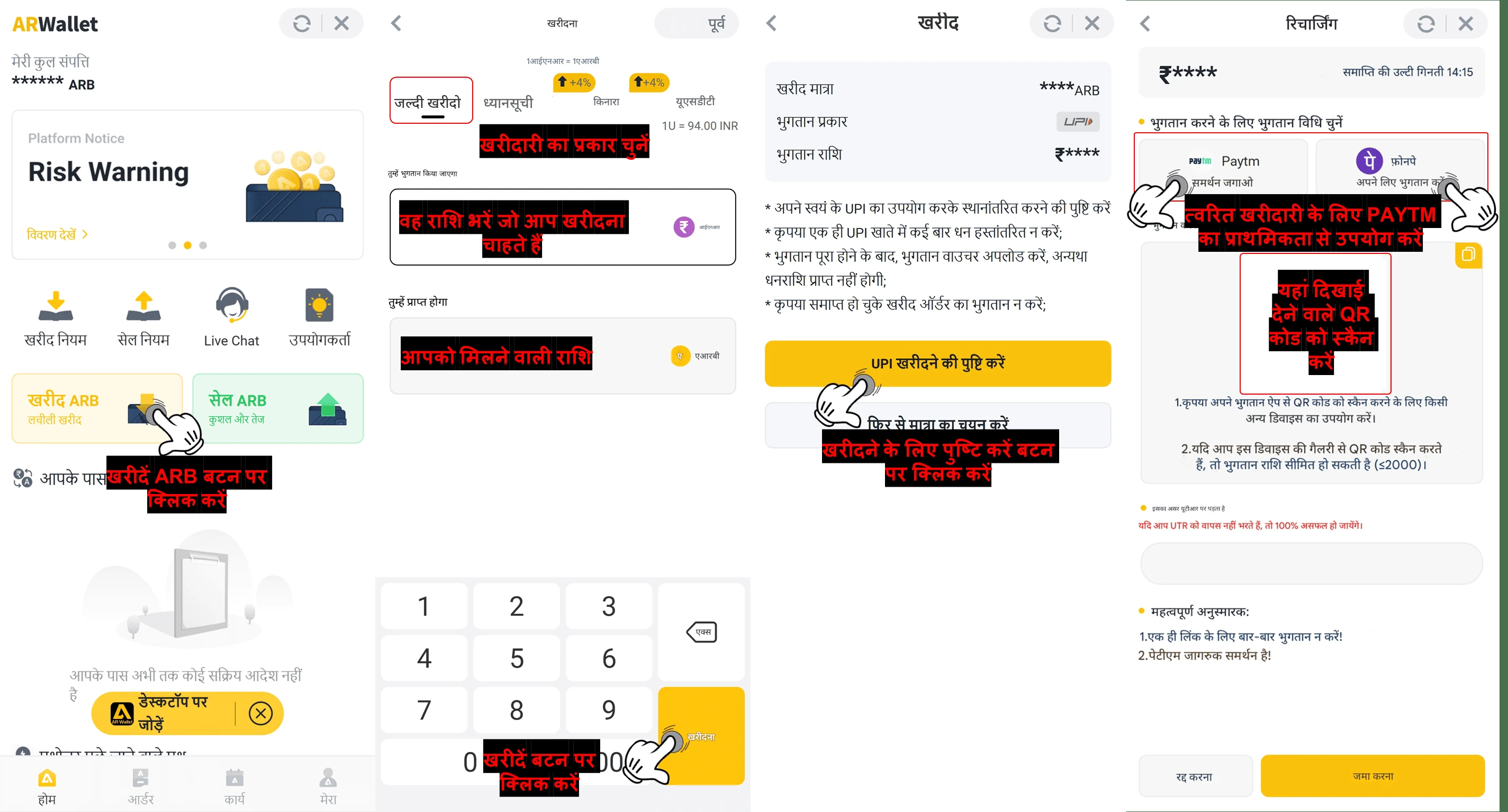
- ARWallet ऐप खोलें
- अपने होमपेज पर जाएँ
- "ARB खरीदें" बटन पर क्लिक करें
- तेज़ खरीदारी के लिए "त्वरित खरीदारी" चुनें
- आप जितनी ARB ख़रीदना चाहते हैं, उसकी राशि दर्ज करें
- आगे बढ़ने के लिए "खरीदें" बटन पर क्लिक करें
- लेन-देन विवरण देखें और "ARB ख़रीदने की पुष्टि करें" बटन पर क्लिक करें
- खरीदारी पूरी करने के लिए भुगतान विधि चुनें
- प्राथमिकता भुगतान विधि चुनें, या अपने UPI ऐप में स्क्रीनशॉट लें/QR कोड स्कैन करें
💳 भुगतान प्रक्रिया
खरीद की पुष्टि करने के बाद, नीचे दिए गए चरणों का उपयोग करके भुगतान जारी रखें :
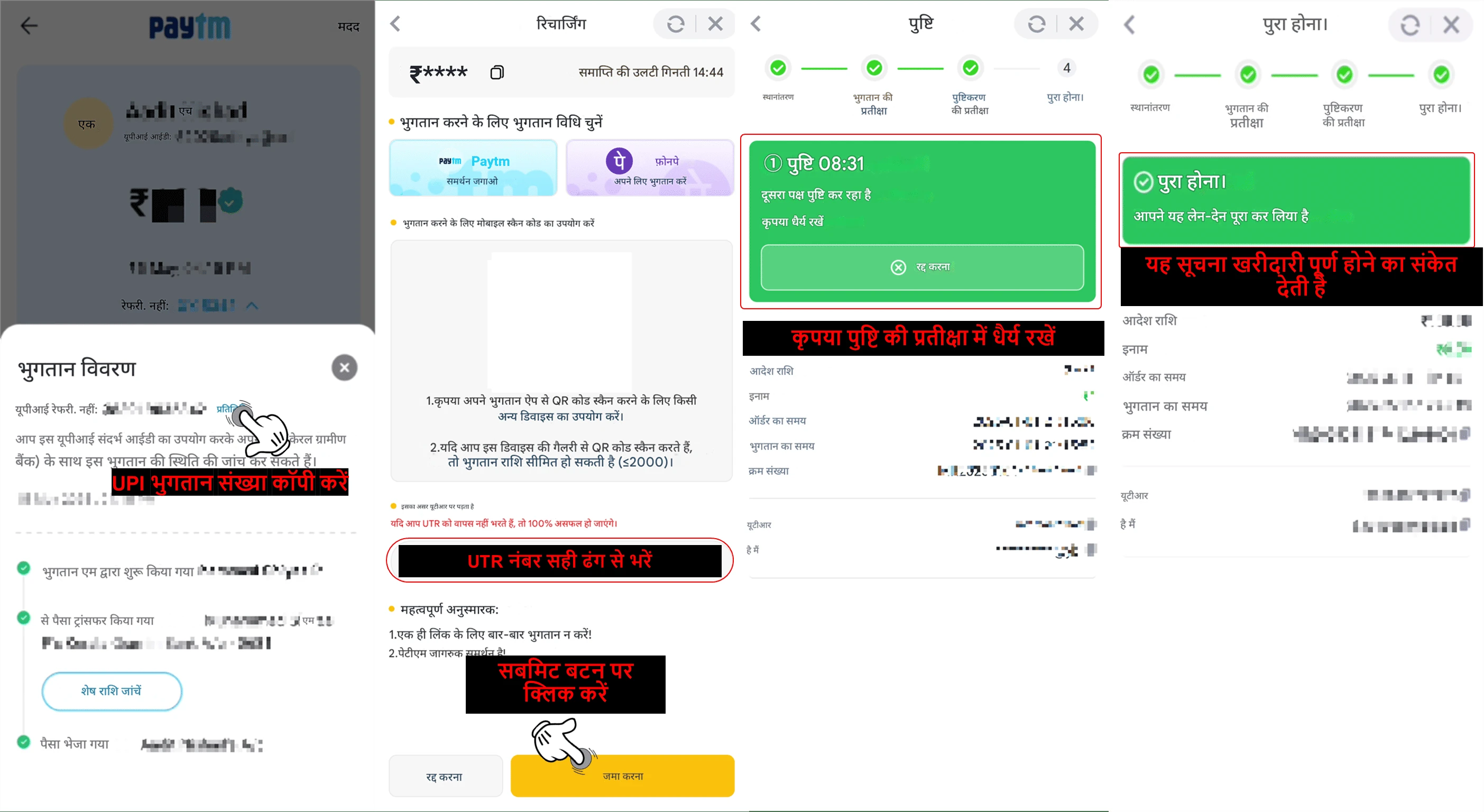
- भुगतान पूरा करने के बाद अपने भुगतान ऐप से UTR नंबर (यूनिक ट्रांजेक्शन रेफरेंस) कॉपी करें
- कृपया UTR नंबर को AR Wallet में पेस्ट करें।
- अपने भुगतान की पुष्टि के लिए "सबमिट" बटन पर क्लिक करें
- UTR नंबर सबमिट करने के बाद पुष्टि की प्रतीक्षा करें
- यदि आपने भुगतान कर दिया है और सही UTR नंबर सबमिट कर दिया है, तो आपका खरीद ऑर्डर अपने आप पूरा हो जाएगा।
📝टिप्पणी :
- सुनिश्चित करें कि सभी भुगतान वास्तविक हों और गलत या भ्रामक जानकारी अपलोड न करें।
- फर्जी विवरण सबमिट करने या दुर्भावनापूर्ण ऑर्डर देने से आपका ARWallet खाता स्थायी रूप से निलंबित हो सकता है।
- हमेशा ऑर्डर की सही राशि का भुगतान करें। यदि आप अधिक या कम भुगतान करते हैं, तो ARWallet किसी भी नुकसान के लिए ज़िम्मेदार नहीं होगा, क्योंकि इसे आपकी अपनी गलती माना जाएगा।
- भुगतान निर्देशों का पालन न करने पर आपका ऑर्डर विफल हो सकता है।
📥 How To Deposit ARB To The Platform
After completing your ARB purchase, return to the website and follow these steps :
Click Deposit → choose ARPAY → click on the amount → proceed to transfer the recharge.
Click Deposit → choose ARPAY → click on the amount → proceed to transfer the recharge.
Q : I'm still unsure how to deposit to the platform. Can you explain it in more detail?
A :
Sure! If your AR Wallet currently has no balance, you'll need to purchase ARB coins first.
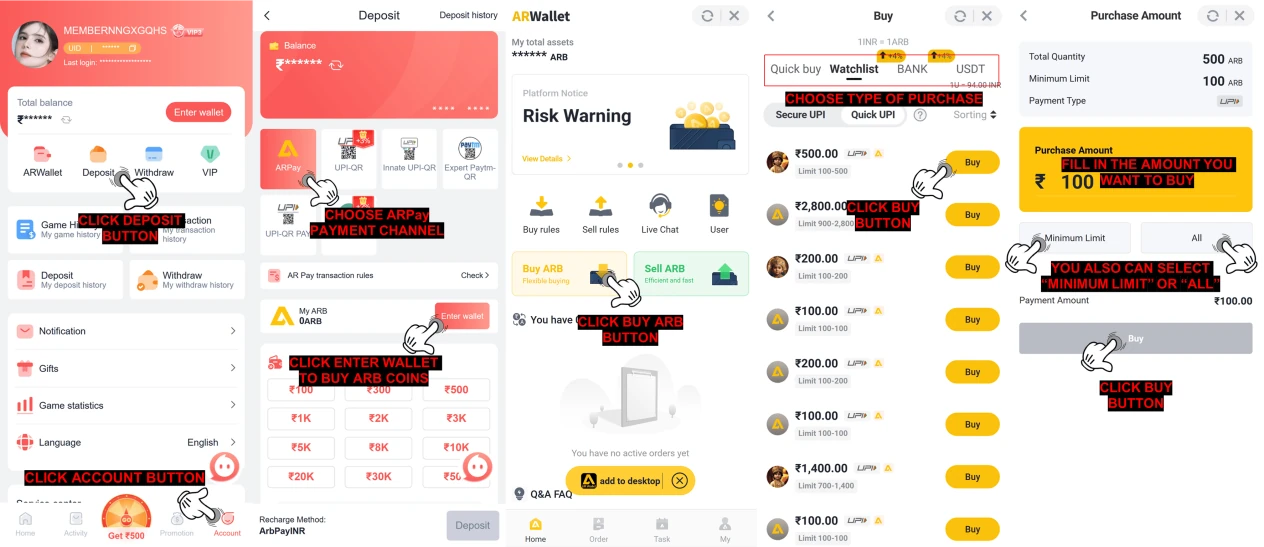
Follow the steps below to fund your AR Wallet by buying ARB :
![How to recharge ARB to the platform — step screenshot]() Complete your payment :
Complete your payment :
![How to recharge ARB to the platform — step screenshot]() After your AR Wallet has been funded, you can proceed with a deposit as usual using your wallet balance. Please follow the detailed steps below to complete your deposit :
After your AR Wallet has been funded, you can proceed with a deposit as usual using your wallet balance. Please follow the detailed steps below to complete your deposit :
![How to recharge ARB to the platform — step screenshot]()
Follow the steps below to fund your AR Wallet by buying ARB :
- Go to your account homepage
- Click the Deposit button
- Choose the ARPay payment channel
- Click Enter Wallet to begin your ARB purchase
- Click the Buy ARB button
- Choose the type method to buy from the market list.
- Click the Buy button to continue
- Enter the amount of ARB you want to purchase
- You can input an amount manually within the allowed limits or use the Minimum Limit or All options
- Click the Buy button to proceed
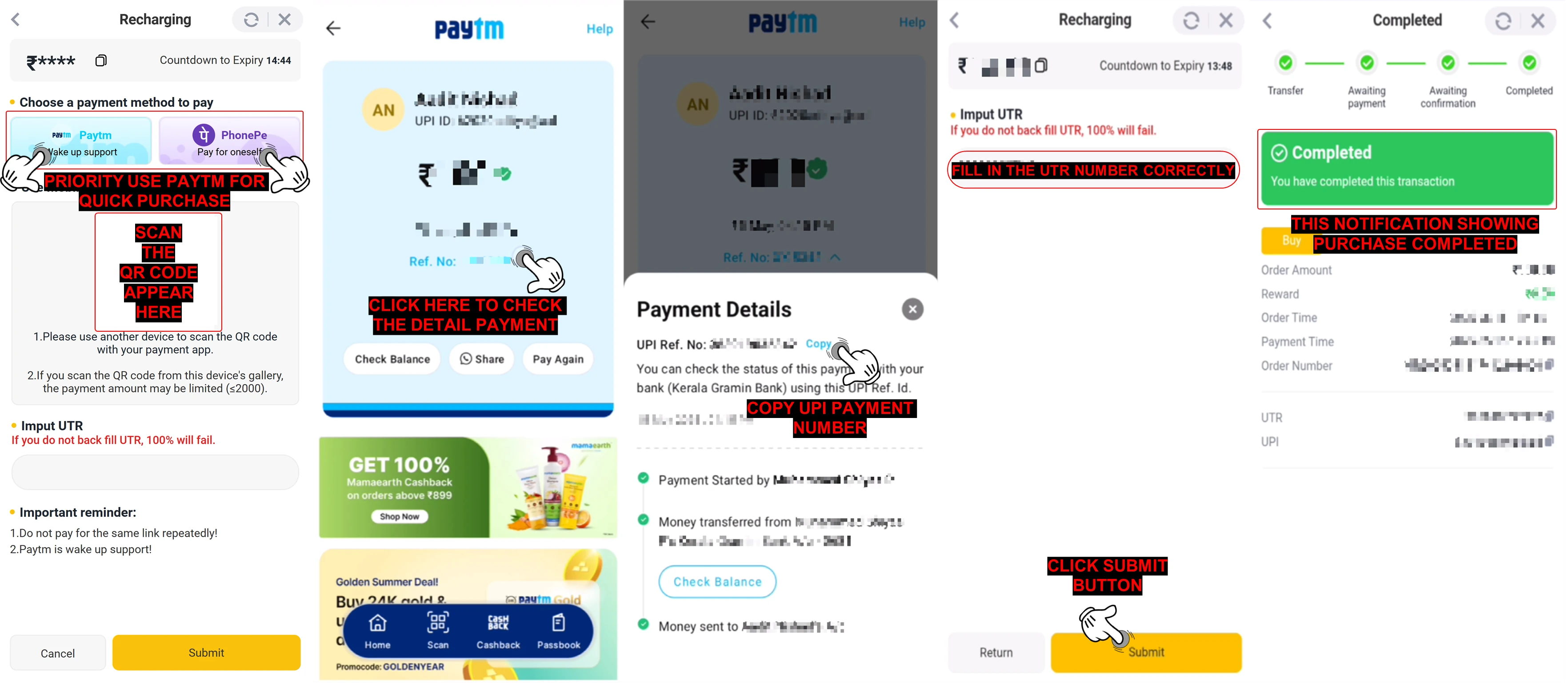
- Select your preferred payment method.
- Click the Paytm button to proceed to Paytm for a quick payment.
- If using another UPI method, scan the provided QR code or save it to make the transfer.
- After making the transfer, enter the UTR (Unique Transaction Reference) number.
- Click the "Submit" button to confirm your payment.
- Once your transaction is confirmed, you will receive a purchase confirmation notification.
- Go to your account homepage
- Click the Deposit button
- Choose the ARPay payment channel
- Input the amount of ARB you would like to deposit
- You'll be redirected to the ARPay payment page
- Enter your payment password
- Click the "Confirm Payment" button
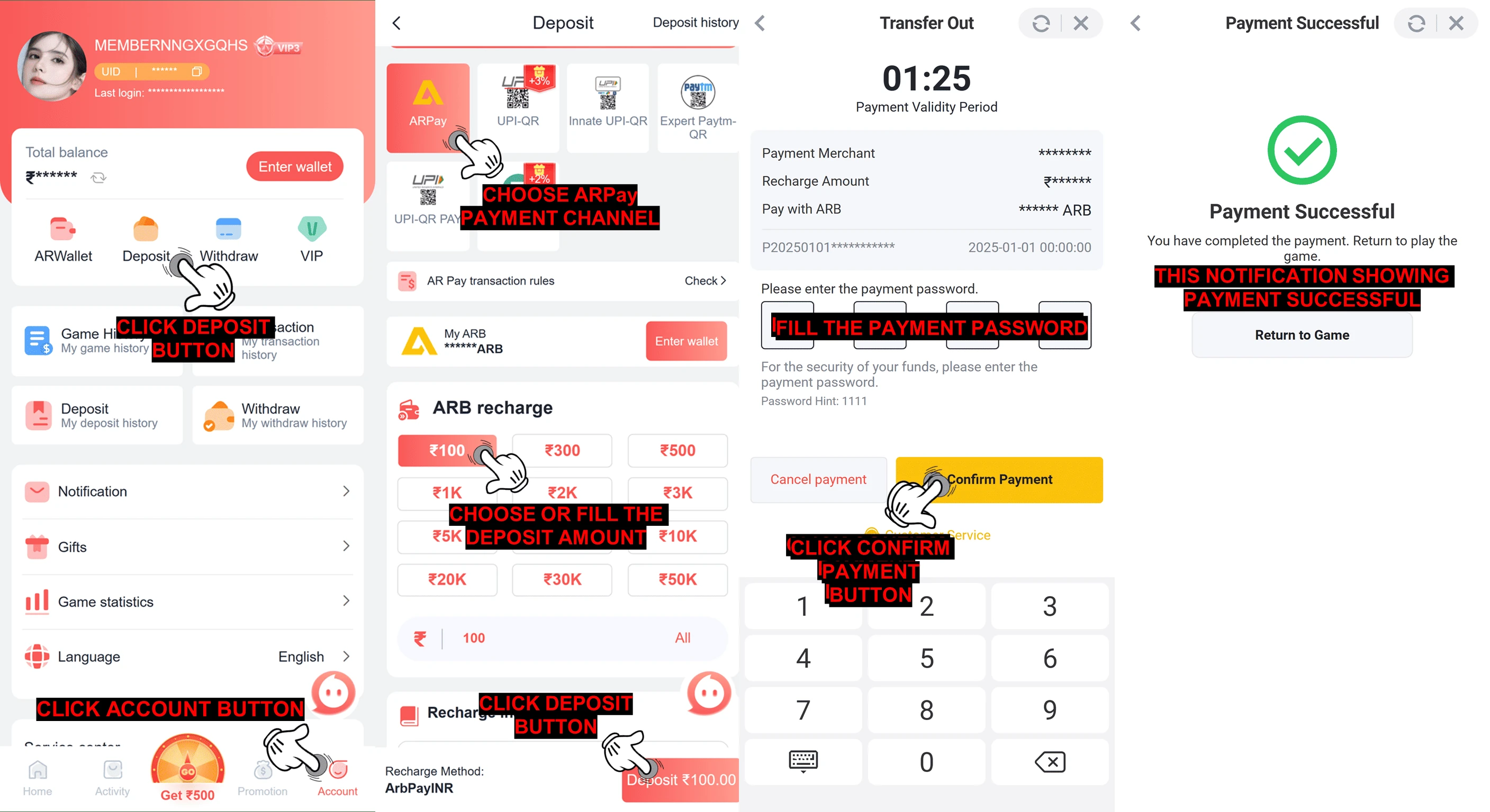
🔔 Reminder : After completing the payment, remember to click the Confirm button to finalize the process.
📝Note :
Please enter the
correct UTR number
from your completed payment to ensure your deposit is
processed without delay.
📥 प्लेटफॉर्म पर ARB रिचार्ज कैसे करें
अपनी ARB खरीदारी पूरी करने के बाद, वेबसाइट पर वापस जाएँ और इन चरणों का पालन करें :
जमा करें पर क्लिक करें → ARPAY चुनें → राशि पर क्लिक करें → रिचार्ज ट्रांसफर करने के लिए आगे बढ़ें।
जमा करें पर क्लिक करें → ARPAY चुनें → राशि पर क्लिक करें → रिचार्ज ट्रांसफर करने के लिए आगे बढ़ें।
प्रश्न : मुझे अभी भी समझ नहीं आ रहा है कि प्लेटफ़ॉर्म पर पैसे कैसे जमा करें। क्या आप इसे और विस्तार से समझा सकते हैं?
उत्तर :
ज़रूर! अगर आपके AR वॉलेट में अभी कोई बैलेंस नहीं है, तो आपको पहले ARB कॉइन खरीदने होंगे।
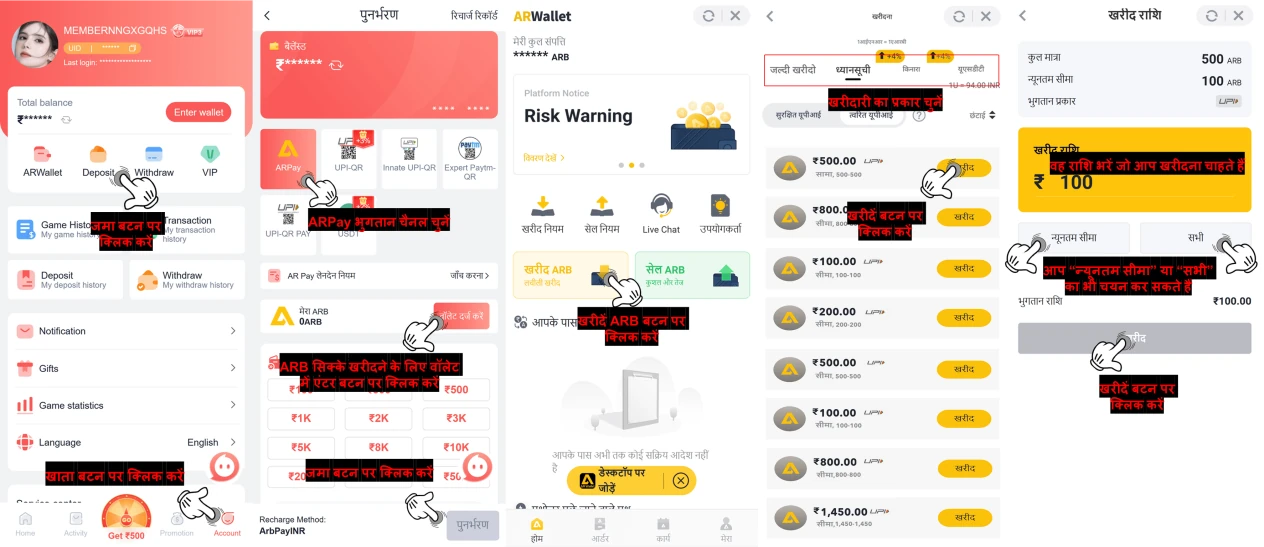
ARB खरीदकर अपने AR वॉलेट में धनराशि जमा करने के लिए नीचे दिए गए चरणों का पालन करें :
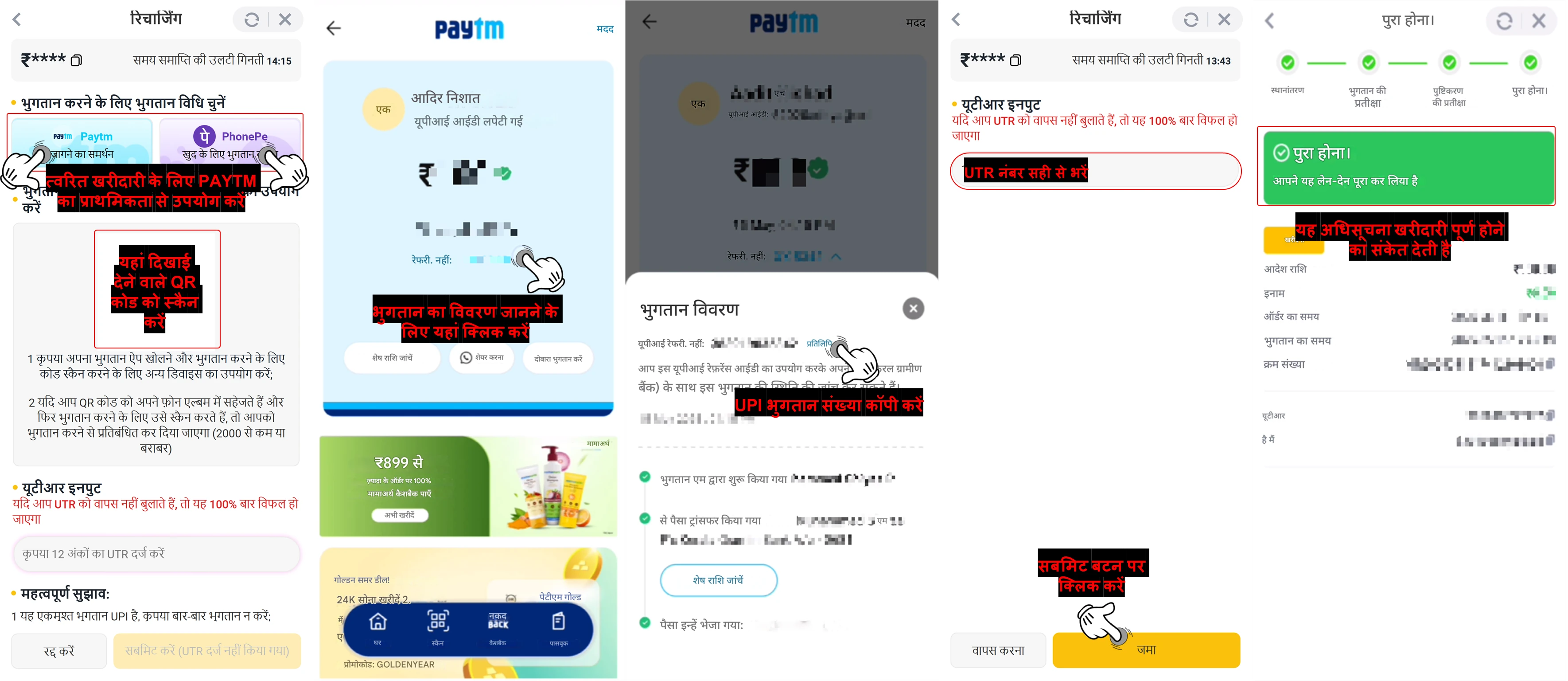
![How to recharge ARB to the platform — step screenshot]() अपना भुगतान पूरा करें :
अपना भुगतान पूरा करें :
![How to recharge ARB to the platform — step screenshot]() आपके AR वॉलेट में धनराशि जमा हो जाने के बाद, आप अपने वॉलेट बैलेंस का उपयोग करके हमेशा की तरह जमा कर सकते हैं। कृपया अपना जमा पूरा करने के लिए नीचे दिए गए विस्तृत चरणों का पालन करें :
आपके AR वॉलेट में धनराशि जमा हो जाने के बाद, आप अपने वॉलेट बैलेंस का उपयोग करके हमेशा की तरह जमा कर सकते हैं। कृपया अपना जमा पूरा करने के लिए नीचे दिए गए विस्तृत चरणों का पालन करें :
![How to recharge ARB to the platform — step screenshot]()
ARB खरीदकर अपने AR वॉलेट में धनराशि जमा करने के लिए नीचे दिए गए चरणों का पालन करें :
- अपने खाते होमपेज पर जाएँ
- जमा बटन पर क्लिक करें
- ARPay भुगतान चैनल चुनें
- अपनी ARB खरीदारी शुरू करने के लिए वॉलेट दर्ज करें पर क्लिक करें
- ARB खरीदें बटन पर क्लिक करें
- बाजार सूची से खरीदने के लिए प्रकार विधि चुनें।
- जारी रखने के लिए खरीदें बटन पर क्लिक करें
- वह ARB राशि दर्ज करें जिसे आप खरीदना चाहते हैं
- आप अनुमत सीमाओं के भीतर मैन्युअल रूप से राशि दर्ज कर सकते हैं या न्यूनतम सीमा या सभी विकल्पों का उपयोग कर सकते हैं
- आगे बढ़ने के लिए खरीदें बटन पर क्लिक करें
- अपनी पसंदीदा भुगतान विधि चुनें।
- त्वरित भुगतान के लिए पेटीएम पर आगे बढ़ने के लिए पेटीएम बटन पर क्लिक करें।
- यदि किसी अन्य UPI विधि का उपयोग कर रहे हैं, तो दिए गए QR कोड को स्कैन करें या ट्रांसफर करने के लिए इसे सेव करें।
- ट्रांसफर करने के बाद, UTR (यूनिक ट्रांजेक्शन रेफरेंस) नंबर दर्ज करें।
- अपने भुगतान की पुष्टि करने के लिए "सबमिट" बटन पर क्लिक करें।
- एक बार जब आपका लेनदेन कन्फर्म हो जाता है, तो आपको एक खरीद पुष्टिकरण सूचना प्राप्त होगी।
- अपने खाते के होमपेज पर जाएँ
- जमा करें बटन पर क्लिक करें
- ARPay भुगतान चैनल चुनें
- वह ARB राशि दर्ज करें जिसे आप जमा करना चाहते हैं
- आपको ARPay भुगतान पृष्ठ पर पुनः निर्देशित किया जाएगा
- अपना भुगतान पासवर्ड दर्ज करें
- "भुगतान की पुष्टि करें" बटन पर क्लिक करें
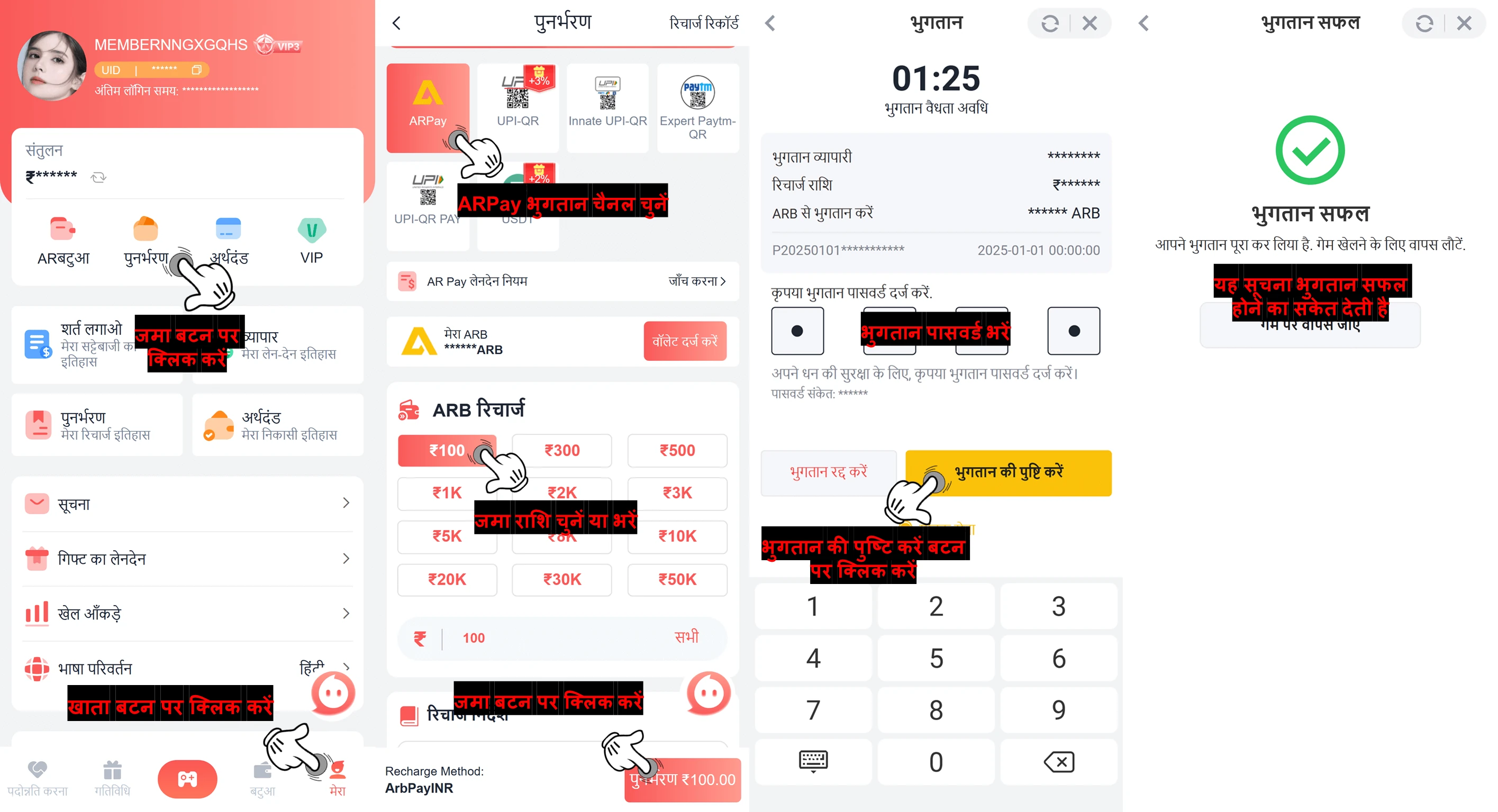
🔔 अनुस्मारक : भुगतान पूरा करने के बाद, प्रक्रिया को अंतिम रूप देने के लिए पुष्टि बटन पर क्लिक करना न भूलें।
📝नोट :
कृपया अपने पूर्ण किए गए भुगतान से
सही UTR नंबर
दर्ज करें ताकि यह सुनिश्चित हो सके कि आपकी जमा राशि
बिना देरी के संसाधित हो।
💰 How To Sell ARB Coins using UPI Method
Q : How to withdraw to bank account?
A :
If you're using our AR Wallet C2C payment system, you'll need to sell ARB to a buyer. Through this process, the buyer can transfer funds to your UPI account. It's important to note that we do not currently support direct withdrawals to your bank account. Always remember to check your UPI account for make sure that you received the funds before confirming any transaction to avoid any potential losses!
Q : How can I sell ARB Coins and receive payment via UPI?
A :
To sell ARB coins with UPI payment method, please follow the steps below :
![How To Sell ARB Coins using UPI Method — step screenshot]()
![How To Sell ARB Coins using UPI Method — step screenshot]()
- Log in to your ARWallet account on https://arbpay.me/
- Click on the Home button to access the main dashboard
- Choose Sell ARB from the available options
- Click Sell ARB again to begin the setup
- Click the "Go to add" button to start adding a payment method
- Choose your preferred bank type
- Enter your registered phone number
- Click "Next" to proceed
- Click Send to receive a verification code, then enter the code
- Click the "Add UPI" button link your UPI ID
🔔 Reminder :
Once set up, your UPI ID will be available as a payment method when listing ARB coins for sale in P2P trades.
Q : After I set up UPI as a payment method, can I start selling my ARB coins on ARWallet?
A :
Yes, once you've successfully added your UPI payment method, you can begin selling your ARB coins. Follow the steps below to complete your sale smoothly and securely :
Steps to Sell ARB Using UPI in ARWallet :
1. Open the ARWallet App.
![How To Sell ARB Coins using UPI Method — step screenshot]() 6. Confirm Link
6. Confirm Link
Steps to Sell ARB Using UPI in ARWallet :
1. Open the ARWallet App.
- Launch the ARWallet app, log in to your account, and navigate to the home screen.
- From there, select "Sell ARB" under the trading or peer-to-peer (P2P) options.
- Review the note provided, then click the "I have Known" button to proceed.
- Click on "Collection" from the available options to begin linking your UPI payment method.
- Click "Operate" to choose the UPI payment method you want to link.
- Click the "Link" button to reconnect your selected UPI payment method.
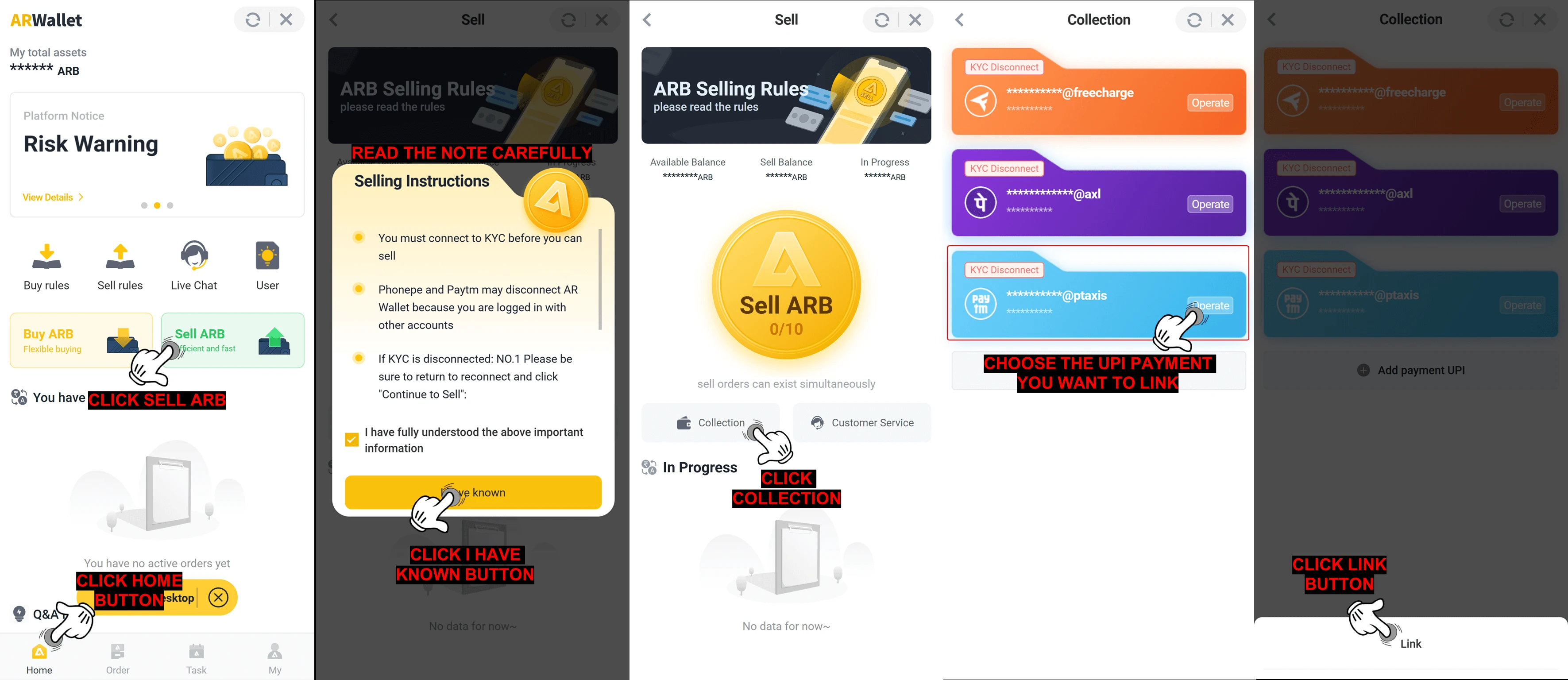
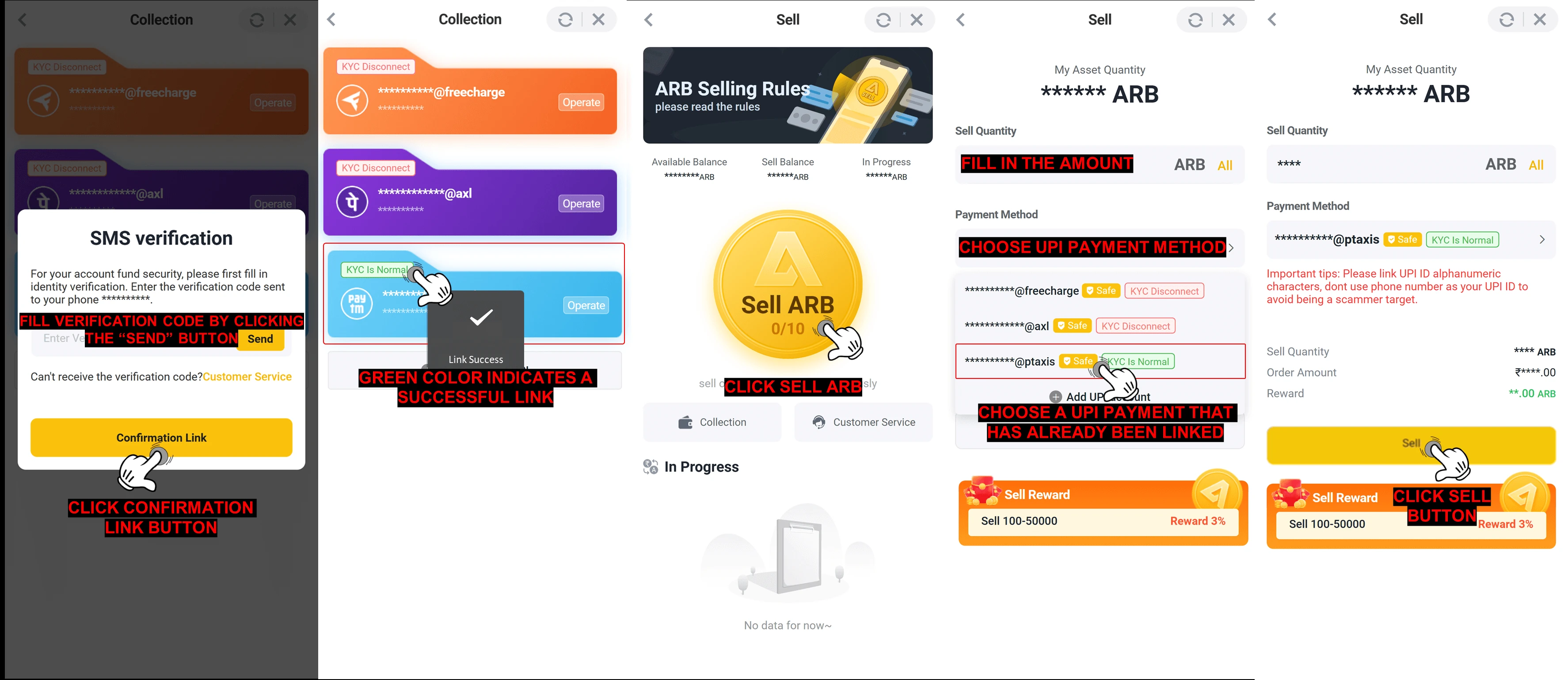
- Click "Send" to receive a verification code. Enter the code, then click the "Confirm Link" button.
- Your KYC status must always be showing " KYC Is Normal " in order to sell.
- Staying online ensures a smooth selling process and helps maintain your green status ( KYC Is Normal ).
📌 Reminder :
The system will automatically complete the transaction on your behalf once your sell order is successfully processed. The funds will be directly credited to your UPI account.
8. Click on "Sell ARB"
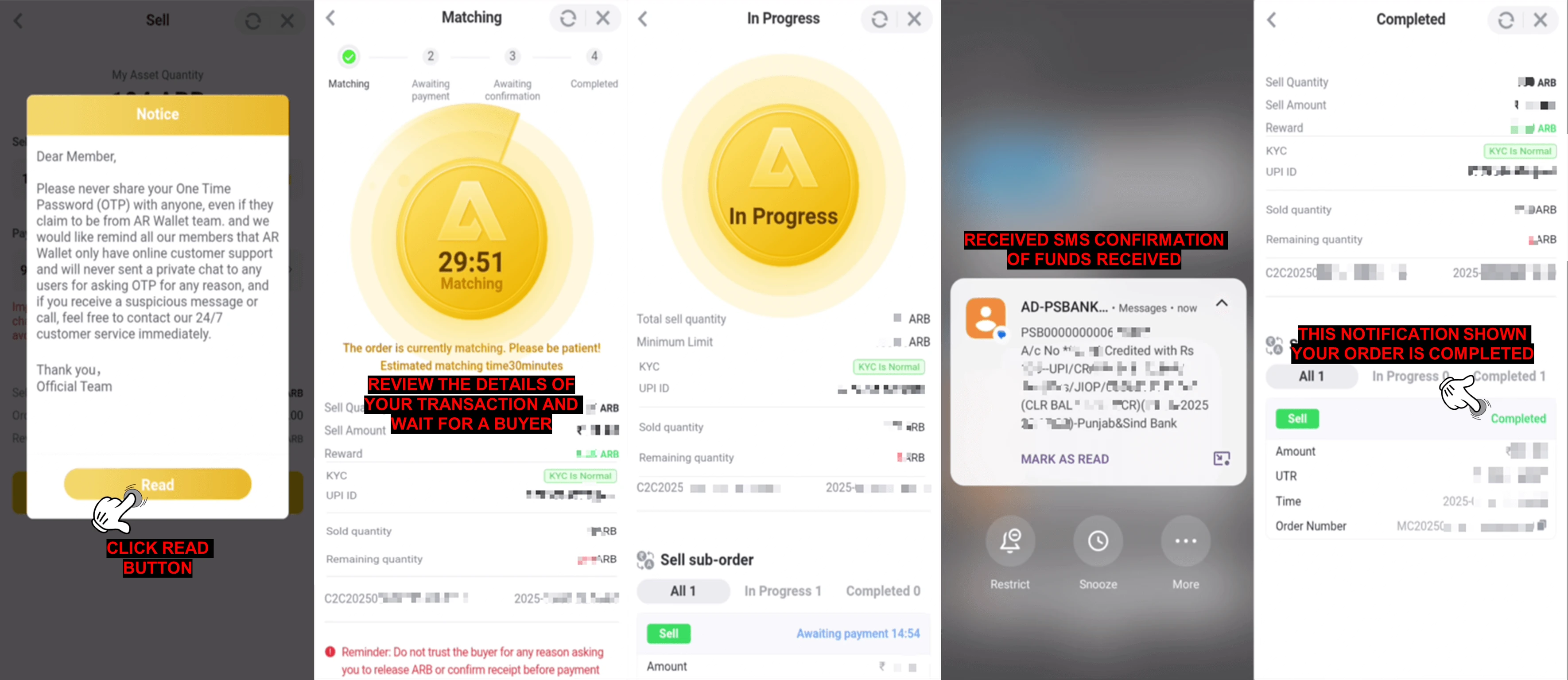
📝 Note: You may monitor the order status through the notification updates, and you will also receive an SMS confirmation once the amount has been successfully credited.
- From the coins list, select ARB (Arbitrum) and click the "Sell" option.
- Input the amount of ARB you want to sell.
-
Choose UPI as your payment method.
- Make sure your UPI ID is correctly saved and linked to your ARWallet account, then click the "Sell" button to proceed.
![How To Sell ARB Coins using UPI Method — step screenshot]()
11. Notice Appears- Read the notice carefully, then click the "Read" button to proceed.
- Review all transaction details, then confirm your order to list it on the platform.
- Once a buyer accepts your offer, they will send the payment to your linked UPI ID.
- You'll receive an SMS notification once the payment is credited. Check the SMS to confirm the received amount.
- The transaction will be automatically marked as completed after payment is confirmed.
![How To Sell ARB Coins using UPI Method — step screenshot]() ⚠️ Safety Tips :
⚠️ Safety Tips :- Ensure your chosen UPI payment method is successfully linked and marked in green ( KYC Is Normal ) before proceeding with the sale of your ARB.
- Double-check all details and wait patiently for confirmation that the sale has been successfully completed via UPI.
Q : How can I be sure the money has entered my bank account after the transaction is confirmed?
A :
You can verify the payment using any of the following methods :
Enjoy a seamless experience and avoid the need for manual bank verification simply by linking your recipient's UPI address before create a transaction.
- Ensure that the recipient's UPI address is linked before initiating a selling transaction. This will allow the system to automatically complete your order once you receive an SMS notification from your bank.
- Please check your transaction history in your AR Wallet to confirm whether your selling transaction has been completed. AR Wallet have utilizes advanced technology to authenticate and verify your bank payment securely. So there is no need hussle for make a checking through your bank apps
Enjoy a seamless experience and avoid the need for manual bank verification simply by linking your recipient's UPI address before create a transaction.
💰 UPI विधि का उपयोग करके ARB सिक्के कैसे बेचें
प्रश्न : बैंक खाते में पैसे कैसे निकालें ?
उत्तर :
यदि आप हमारे AR वॉलेट C2C भुगतान प्रणाली का उपयोग कर रहे हैं, तो आपको किसी खरीदार को ARB बेचना होगा। इस प्रक्रिया के माध्यम से, खरीदार आपके UPI खाते में धनराशि स्थानांतरित कर सकता है। यह ध्यान रखना महत्वपूर्ण है कि हम वर्तमान में आपके बैंक खाते में सीधे निकासी का समर्थन नहीं करते हैं। किसी भी संभावित नुकसान से बचने के लिए किसी भी लेनदेन की पुष्टि करने से पहले अपने UPI खाते की जांच करना हमेशा याद रखें!
प्रश्न : मैं एआरबी सिक्के कैसे बेच सकता हूं और यूपीआई के माध्यम से भुगतान कैसे प्राप्त कर सकता हूं?
उत्तर :
UPI भुगतान विधि से ARB सिक्के बेचने के लिए, कृपया नीचे दिए गए चरणों का पालन करें :
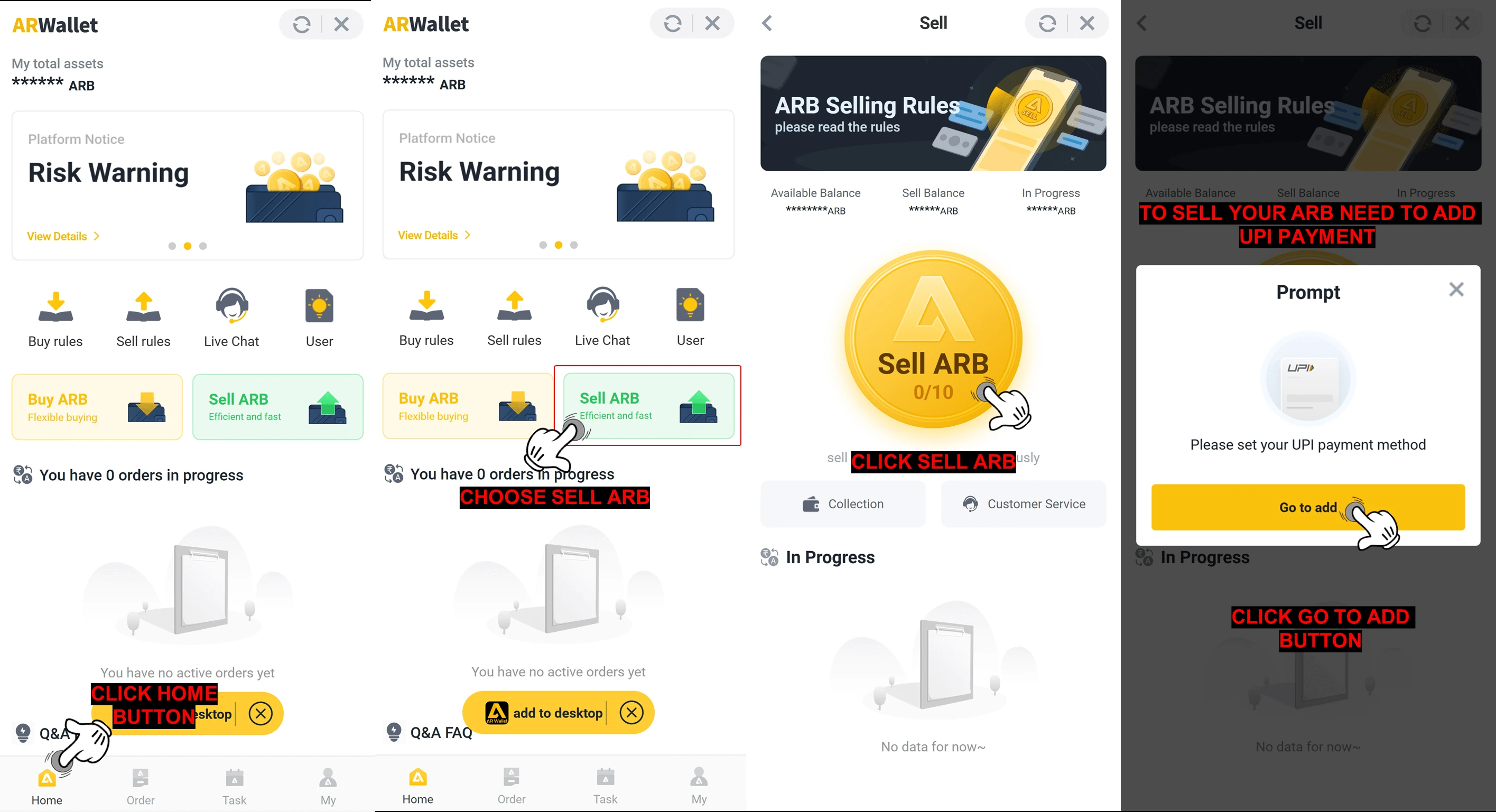
![How To Sell ARB Coins using UPI Method — step screenshot]()
![How To Sell ARB Coins using UPI Method — step screenshot]()
- पर अपने ARWallet खाते में लॉग इन करें https://arbpay.me/
- मुख्य डैशबोर्ड तक पहुँचने के लिए होम बटन पर क्लिक करें
- उपलब्ध विकल्पों में से ARB बेचें चुनें
- सेटअप शुरू करने के लिए फिर से ARB बेचें पर क्लिक करें
- भुगतान विधि जोड़ना शुरू करने के लिए "जोड़ें पर जाएँ" बटन पर क्लिक करें
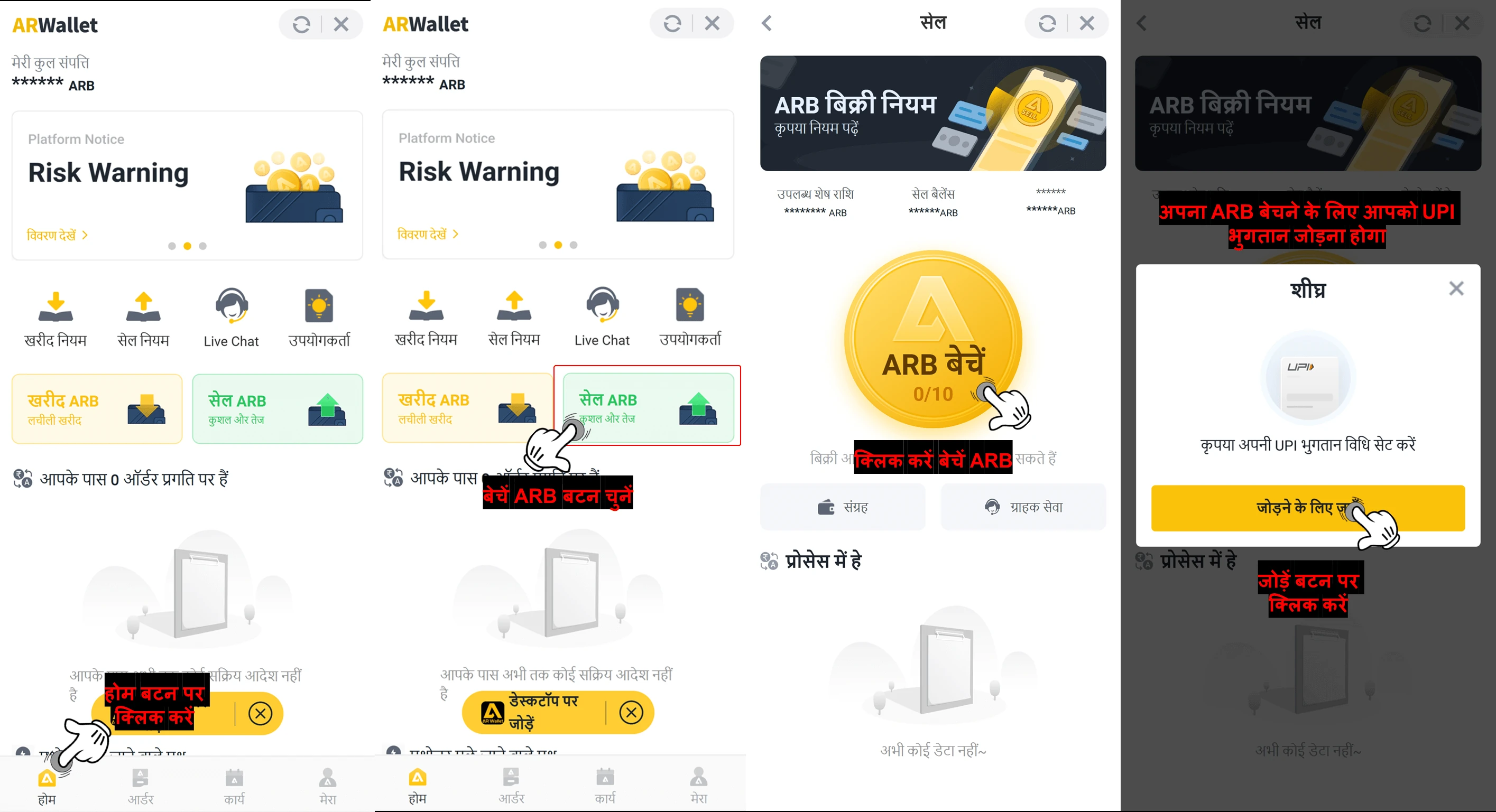
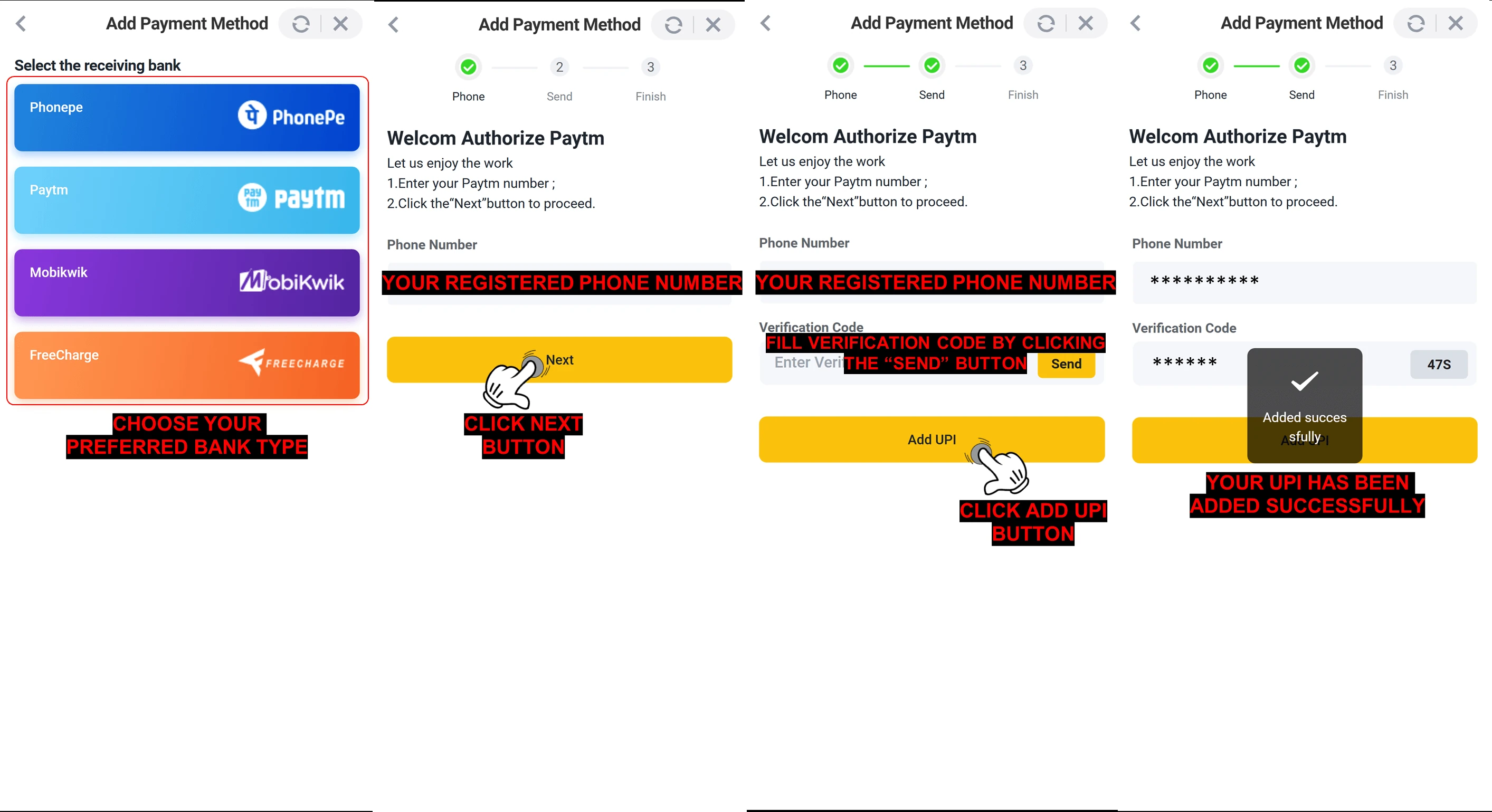
- अपना पसंदीदा बैंक प्रकार चुनें
- अपना पंजीकृत फ़ोन नंबर दर्ज करें
- आगे बढ़ने के लिए "अगला" पर क्लिक करें
- सत्यापन कोड प्राप्त करने के लिए भेजें पर क्लिक करें, फिर कोड दर्ज करें
- अपना UPI आईडी लिंक करने के लिए "UPI जोड़ें" बटन पर क्लिक करें
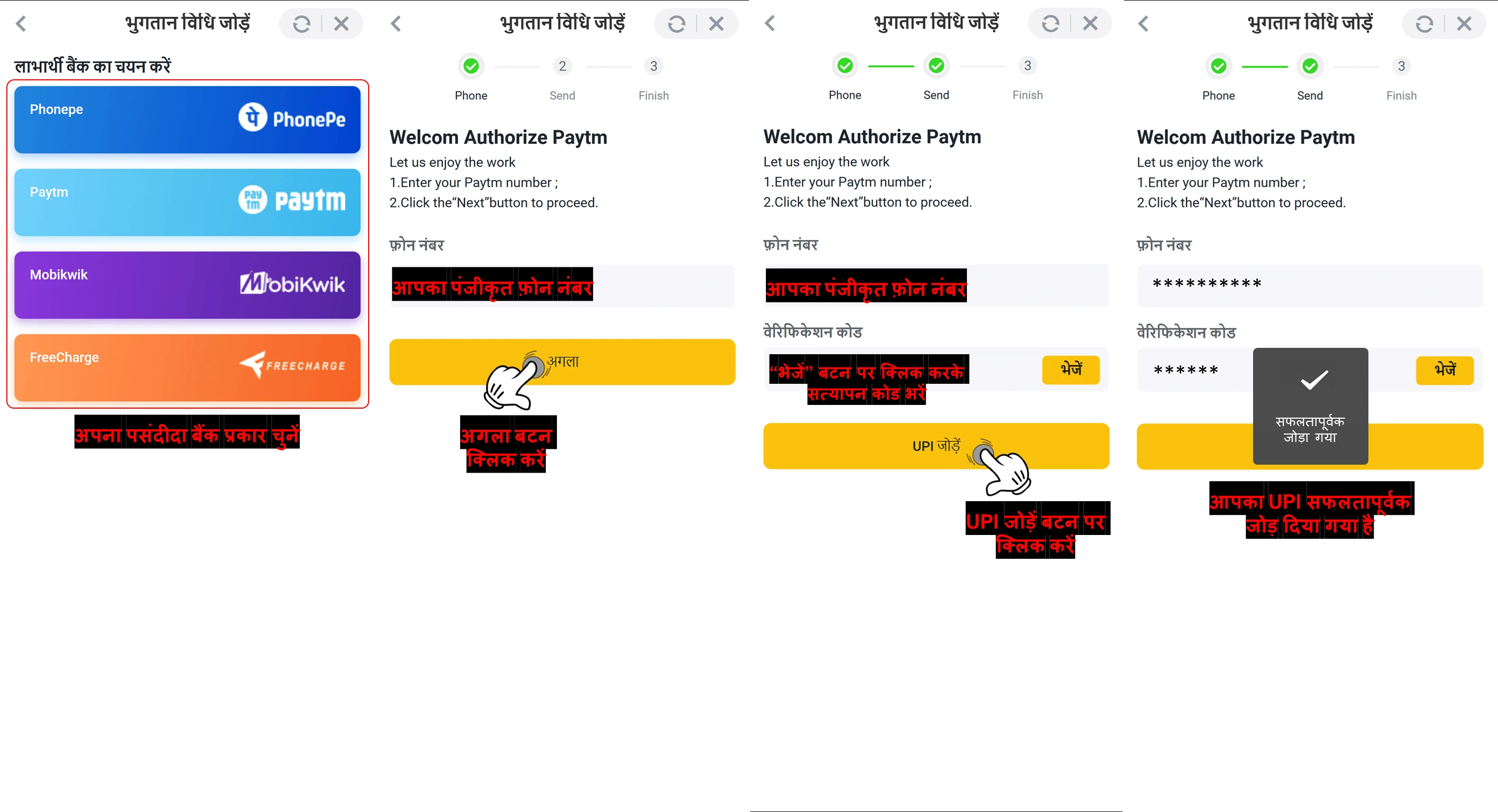
🔔 अनुस्मारक :
एक बार सेट हो जाने पर, आपकी UPI आईडी P2P ट्रेडों में बिक्री के लिए ARB सिक्कों को सूचीबद्ध करते समय भुगतान विधि के रूप में उपलब्ध होगी।
प्रश्न : UPI को भुगतान विधि के रूप में सेट करने के बाद, क्या मैं ARWallet पर अपने ARB सिक्के बेचना शुरू कर सकता हूँ ?
उत्तर :
हां, एक बार जब आप सफलतापूर्वक अपना UPI भुगतान तरीका जोड़ लेते हैं, तो आप अपने ARB सिक्के बेचना शुरू कर सकते हैं। अपनी बिक्री को सुचारू और सुरक्षित रूप से पूरा करने के लिए नीचे दिए गए चरणों का पालन करें :
ARWallet में UPI का उपयोग करके ARB बेचने के चरण :
1. ARWallet ऐप खोलें।
![How To Sell ARB Coins using UPI Method — step screenshot]() 6. लिंक की पुष्टि करें
6. लिंक की पुष्टि करें
ARWallet में UPI का उपयोग करके ARB बेचने के चरण :
1. ARWallet ऐप खोलें।
- ARWallet ऐप लॉन्च करें, अपने खाते में लॉग इन करें और होम स्क्रीन पर जाएँ।
- वहाँ से, ट्रेडिंग या पीयर-टू-पीयर (P2P) विकल्पों के अंतर्गत "ARB बेचें" चुनें।
- दिए गए नोट की समीक्षा करें, फिर आगे बढ़ने के लिए "मुझे पता है" बटन पर क्लिक करें।
- अपनी UPI भुगतान विधि को लिंक करना शुरू करने के लिए उपलब्ध विकल्पों में से "संग्रह" पर क्लिक करें।
- वह UPI भुगतान विधि चुनने के लिए "संचालन करें" पर क्लिक करें जिसे आप लिंक करना चाहते हैं।
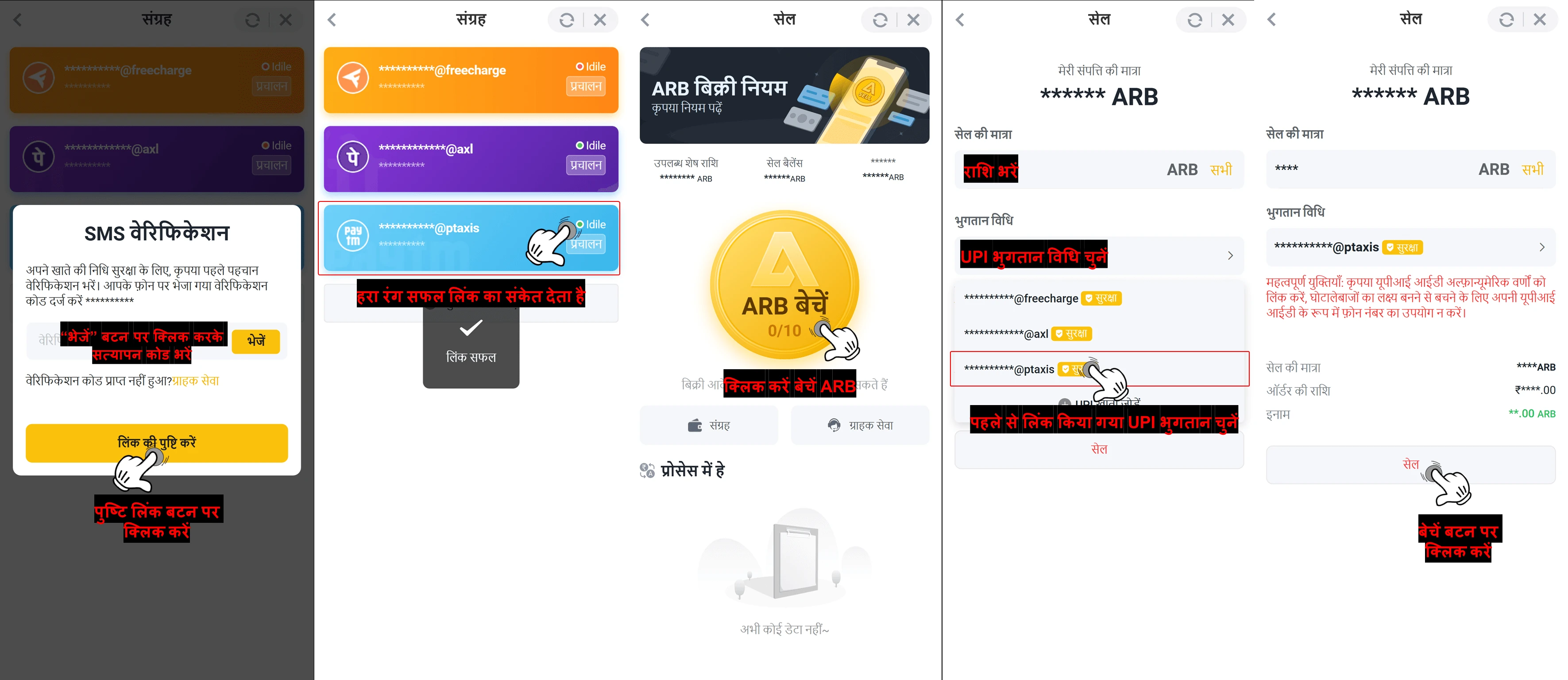
- अपनी चुनी हुई UPI भुगतान विधि को फिर से कनेक्ट करने के लिए "लिंक" बटन पर क्लिक करें।
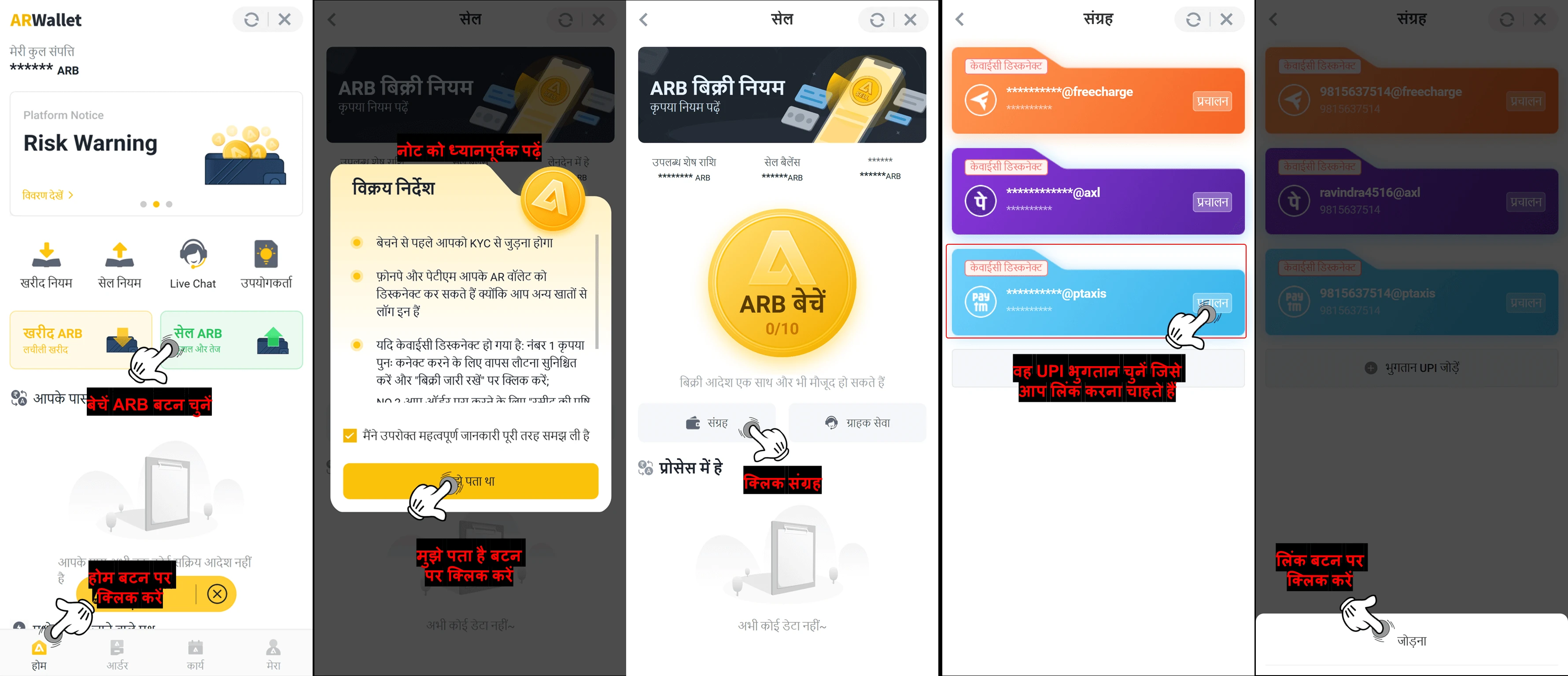
- सत्यापन कोड प्राप्त करने के लिए "भेजें" पर क्लिक करें। कोड दर्ज करें, फिर "लिंक की पुष्टि करें" बटन पर क्लिक करें।
- बेचने के लिए आपकी KYC स्थिति हमेशा हरी होनी चाहिए और " KYC सामान्य है >" दर्शानी चाहिए।
- ऑनलाइन बने रहने से बिक्री प्रक्रिया सुचारू रहती है और आपकी हरी स्थिति को बनाए रखने या " KYC सामान्य है " दर्शाने में मदद मिलती है।
📌 रिमाइंडर :
आपका सेल ऑर्डर सफलतापूर्वक प्रोसेस हो जाने के बाद सिस्टम आपकी ओर से स्वचालित रूप से लेनदेन पूरा कर देगा। धनराशि सीधे आपके UPI खाते में जमा कर दी जाएगी।
8. "सेल एआरबी" पर क्लिक करें
📝 नोट : आप अधिसूचना अपडेट के माध्यम से ऑर्डर की स्थिति की निगरानी कर सकते हैं, और राशि सफलतापूर्वक जमा हो जाने पर आपको एक एसएमएस पुष्टि भी प्राप्त होगी।
- सिक्कों की सूची से, एआरबी (आर्बिट्रम) चुनें और "सेल" विकल्प पर क्लिक करें।
- आप जो ARB बेचना चाहते हैं उसकी राशि दर्ज करें।
-
अपनी भुगतान विधि के रूप में UPI चुनें।
- सुनिश्चित करें कि आपकी UPI ID सही तरीके से सहेजी गई है और आपके ARWallet खाते से जुड़ी हुई है, फिर आगे बढ़ने के लिए "बेचें" बटन पर क्लिक करें।
![How To Sell ARB Coins using UPI Method — step screenshot]()
11. नोटिस दिखाई देता है- नोटिस को ध्यान से पढ़ें, फिर आगे बढ़ने के लिए "पढ़ें" बटन पर क्लिक करें।
- सभी लेन-देन विवरणों की समीक्षा करें, फिर प्लेटफ़ॉर्म पर इसे सूचीबद्ध करने के लिए अपने ऑर्डर की पुष्टि करें।
- जब कोई खरीदार आपका ऑफ़र स्वीकार कर लेता है, तो वे आपके लिंक किए गए UPI ID पर भुगतान भेज देंगे।
- भुगतान जमा होने के बाद आपको एक SMS सूचना प्राप्त होगी। प्राप्त राशि की पुष्टि करने के लिए SMS की जाँच करें।
- भुगतान की पुष्टि होने के बाद लेन-देन स्वचालित रूप से पूरा हो जाएगा।
![How To Sell ARB Coins using UPI Method — step screenshot]() ⚠️ सुरक्षा सुझाव :
⚠️ सुरक्षा सुझाव :- सुनिश्चित करें कि आपके द्वारा चुनी गई UPI भुगतान विधि सफलतापूर्वक लिंक की गई है और आपके ARB की बिक्री के साथ आगे बढ़ने से पहले हरी रंग में चिह्नित है।
- सभी विवरणों की दोबारा जाँच करें और पुष्टि के लिए धैर्यपूर्वक प्रतीक्षा करें कि बिक्री UPI के माध्यम से सफलतापूर्वक पूरी हो गई है।
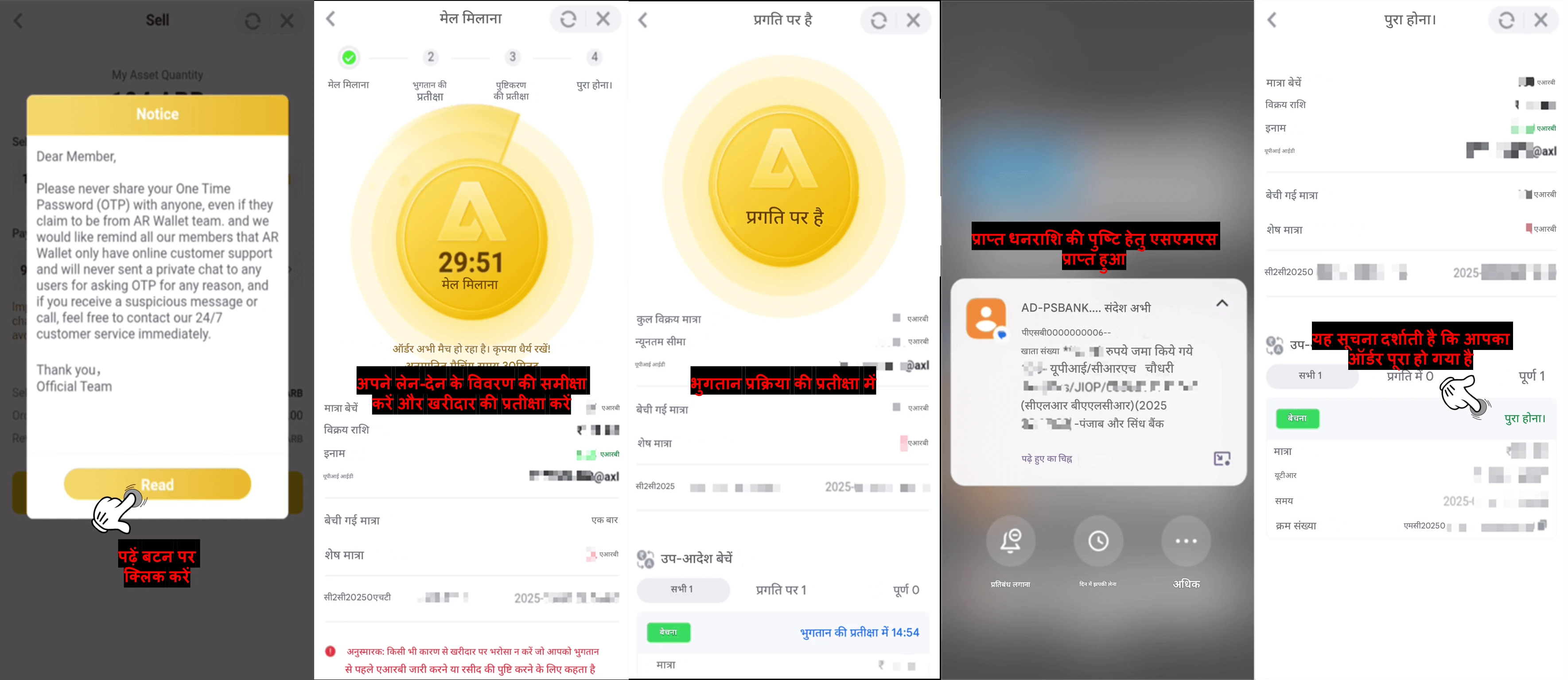
प्रश्न : लेन-देन की पुष्टि होने के बाद मैं कैसे सुनिश्चित कर सकता हूँ कि पैसा मेरे बैंक खाते में आ गया है ?
उत्तर :
आप निम्न में से किसी भी तरीके का उपयोग करके भुगतान को सत्यापित कर सकते हैं :
लेनदेन करने से पहले अपने प्राप्तकर्ता के UPI पते को लिंक करके एक सहज अनुभव का आनंद लें और मैन्युअल बैंक सत्यापन की आवश्यकता से बचें।
- बिक्री लेनदेन शुरू करने से पहले सुनिश्चित करें कि प्राप्तकर्ता का UPI पता लिंक हो। इससे आपके बैंक से SMS सूचना प्राप्त होने पर सिस्टम स्वचालित रूप से आपका ऑर्डर पूरा कर देगा।
- कृपया अपने लेनदेन इतिहास की जांच करें AR Wallet यह पुष्टि करने के लिए कि आपका विक्रय लेनदेन पूरा हो गया है या नहीं। AR Wallet आपके बैंक भुगतान को सुरक्षित रूप से प्रमाणित और सत्यापित करने के लिए उन्नत तकनीक का उपयोग करता है। इसलिए अपने बैंक ऐप के माध्यम से जाँच करने के लिए कोई परेशानी की आवश्यकता नहीं है
लेनदेन करने से पहले अपने प्राप्तकर्ता के UPI पते को लिंक करके एक सहज अनुभव का आनंद लें और मैन्युअल बैंक सत्यापन की आवश्यकता से बचें।
How to withdraw using ARWallet on Platform
Use ARPay to withdraw — the platform will promptly transfer ARB to your ARWallet account.
Q : How can I easily withdraw using ARWallet?
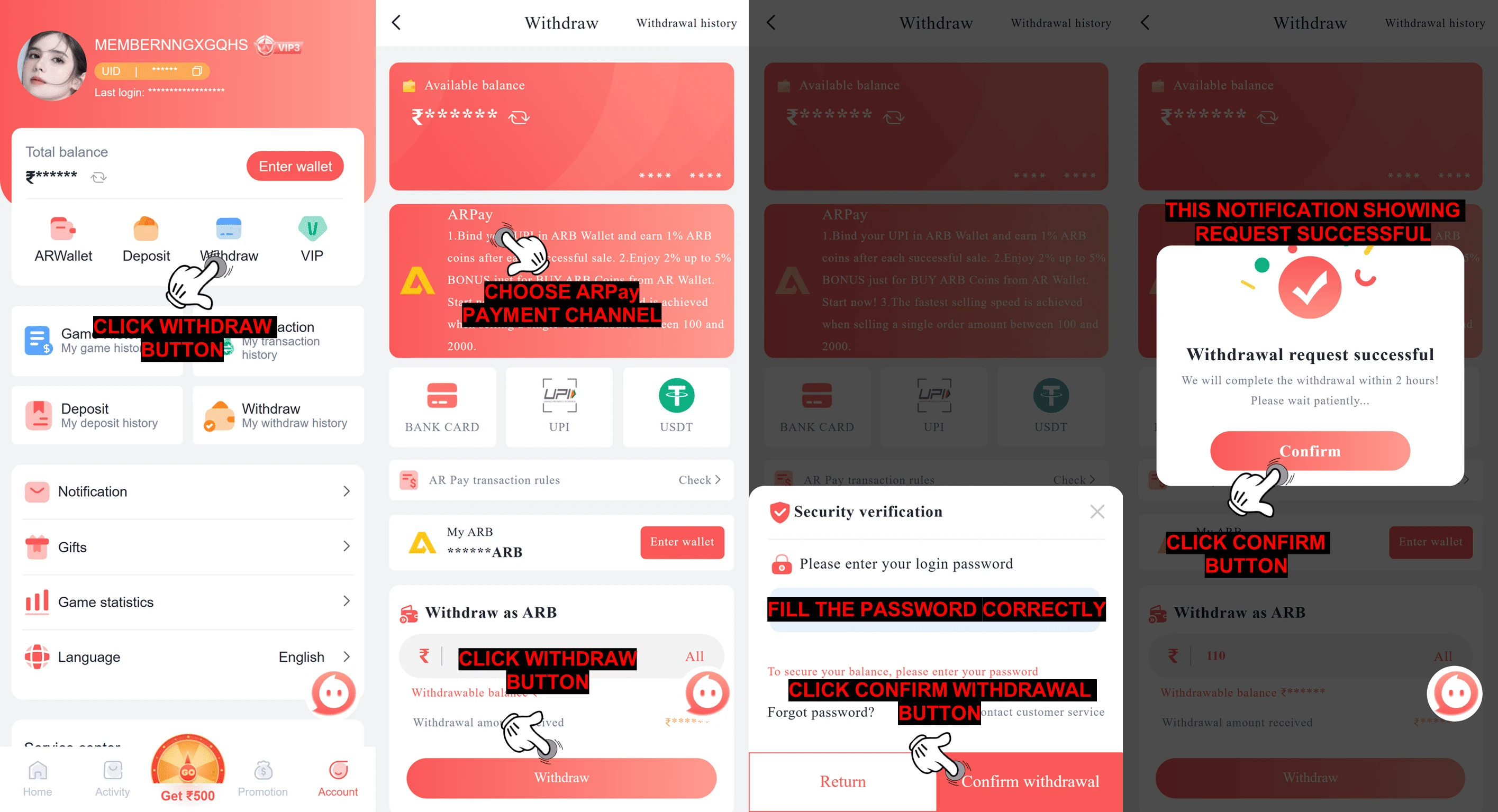
A : Follow these simple steps to withdraw ARB using ARPay :
Follow the steps below to fund your AR Wallet by buying ARB :
Follow the steps below to fund your AR Wallet by buying ARB :
- Go to your account homepage
- Click the Withdraw button
- Choose ARPay as your payment channel
- Input the amount you want to withdraw
- Click the "Withdraw" button
- Enter your login password to authorize the transaction
- Click the "Confirm Withdrawal" button
- Once the withdrawal request is successful, click the "Confirm" button again to complete the process.
📝Note :
- Click Enter Wallet button
- Go to your account homepage
- Click the "My" button
- Choose "Transaction" to check your order status
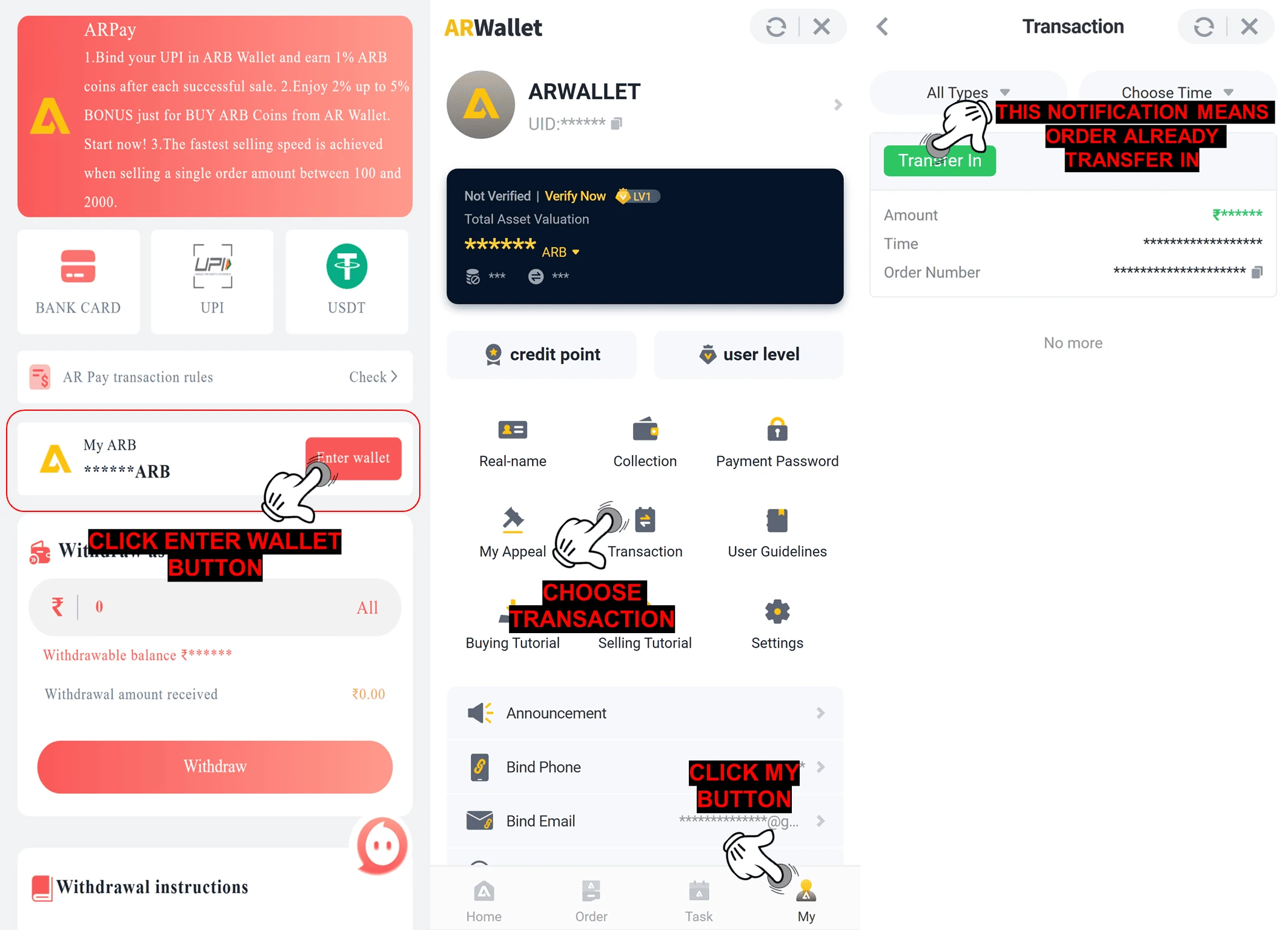
✅ Transfer In to the AR Wallet has been completed. The next step is to sell ARB and withdraw it directly to your UPI account.
Sell ARB tutorial link : 💰 How To Sell ARB Coins using UPI Method
Sell ARB tutorial link : 💰 How To Sell ARB Coins using UPI Method
प्लेटफ़ॉर्म पर AR Wallet का उपयोग करके पैसे कैसे निकालें
निकासी के लिए ARPay का उपयोग करें - प्लेटफ़ॉर्म तुरंत ARB को आपके ARWallet खाते में स्थानांतरित कर देगा।
प्रश्न : मैं ARWallet का उपयोग करके आसानी से कैसे निकासी कर सकता हूँ ?
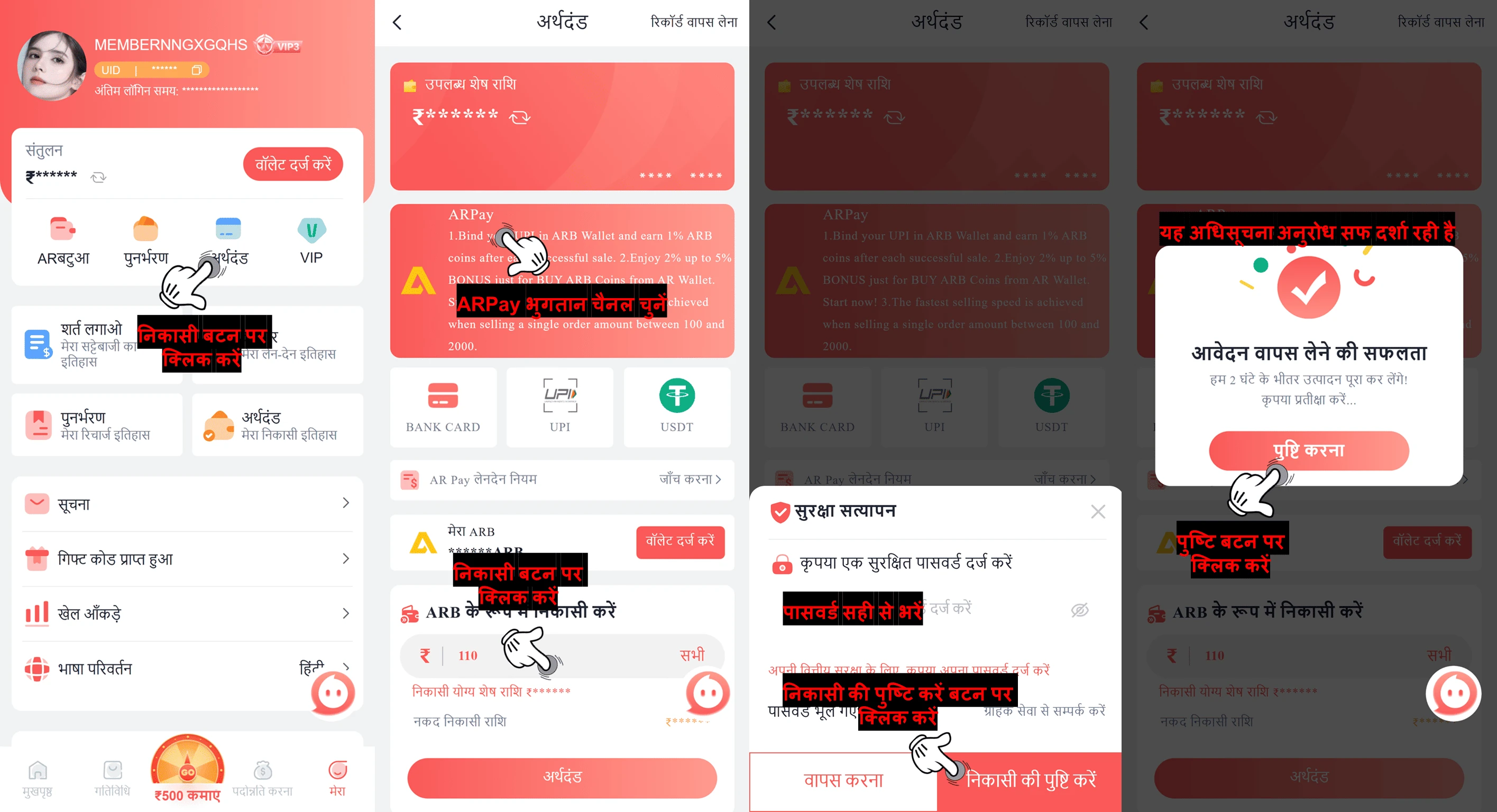
उत्तर : ARPay का उपयोग करके ARB निकालने के लिए इन सरल चरणों का पालन करें :
![How to withdraw using AR wallet on platform — step screenshot]()
![How to withdraw using AR wallet on platform — step screenshot]()
- अपने खाते के होमपेज पर जाएँ
- निकासी बटन पर क्लिक करें
- जारी रखने के लिए ARB निकासी बटन पर क्लिक करें
- अपने भुगतान चैनल के रूप में ARPay चुनें
- वह राशि दर्ज करें जिसे आप निकालना चाहते हैं
- "निकासी" बटन पर क्लिक करें
- लेनदेन को अधिकृत करने के लिए अपना लॉगिन पासवर्ड दर्ज करें
- "निकासी की पुष्टि करें" बटन पर क्लिक करें
- जब निकासी अनुरोध सफल हो जाए, तो प्रक्रिया को पूरा करने के लिए फिर से "पुष्टि करें" बटन पर क्लिक करें।
📝 नोट :
- एंटर वॉलेट बटन पर क्लिक करें
- अपने अकाउंट होमपेज पर जाएं
- "मेरा" बटन पर क्लिक करें
- अपने ऑर्डर की स्थिति जांचने के लिए "लेनदेन" चुनें
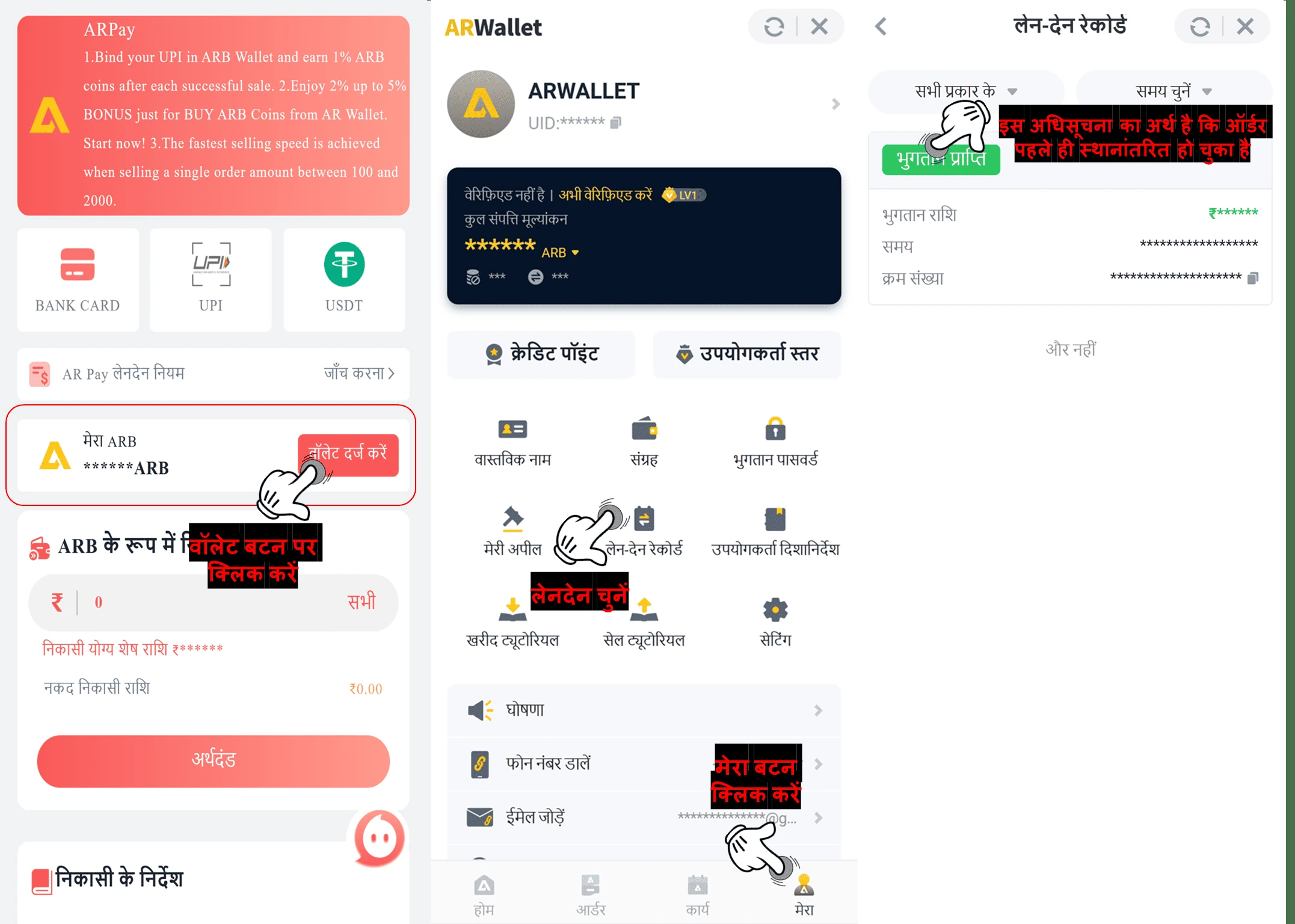
✅ AR Wallet में ट्रांसफर पूरा हो गया है। अगला चरण ARB को बेचना और उसे सीधे अपने UPI खाते में निकालना है।
ARB बेचने का ट्यूटोरियल लिंक : 💰 UPI विधि का उपयोग करके ARB सिक्के कैसे बेचें